Short answer: An HVAC answering service is only as good as the record it leaves: emergency or routine, the address, the job type and a booking your dispatcher can see. There are four ways to get one in 2026: a live answering service, an AI receptionist product, the AI built into the field-service software you already run (ServiceTitan, Housecall Pro or Jobber), or a custom agent. Try the software's own agent first if you run one of those three. Move to a service or a custom build only when its rules, fees or on-call rota do not fit.
We make Pond, which builds custom AI agents, including answering agents, so weigh our view of the build route accordingly. Every price below is the vendor's own US list price, read on the vendor's page on November 13, 2026, each page read more than once. Prices are monthly unless a row says otherwise. Check the page again before you buy.
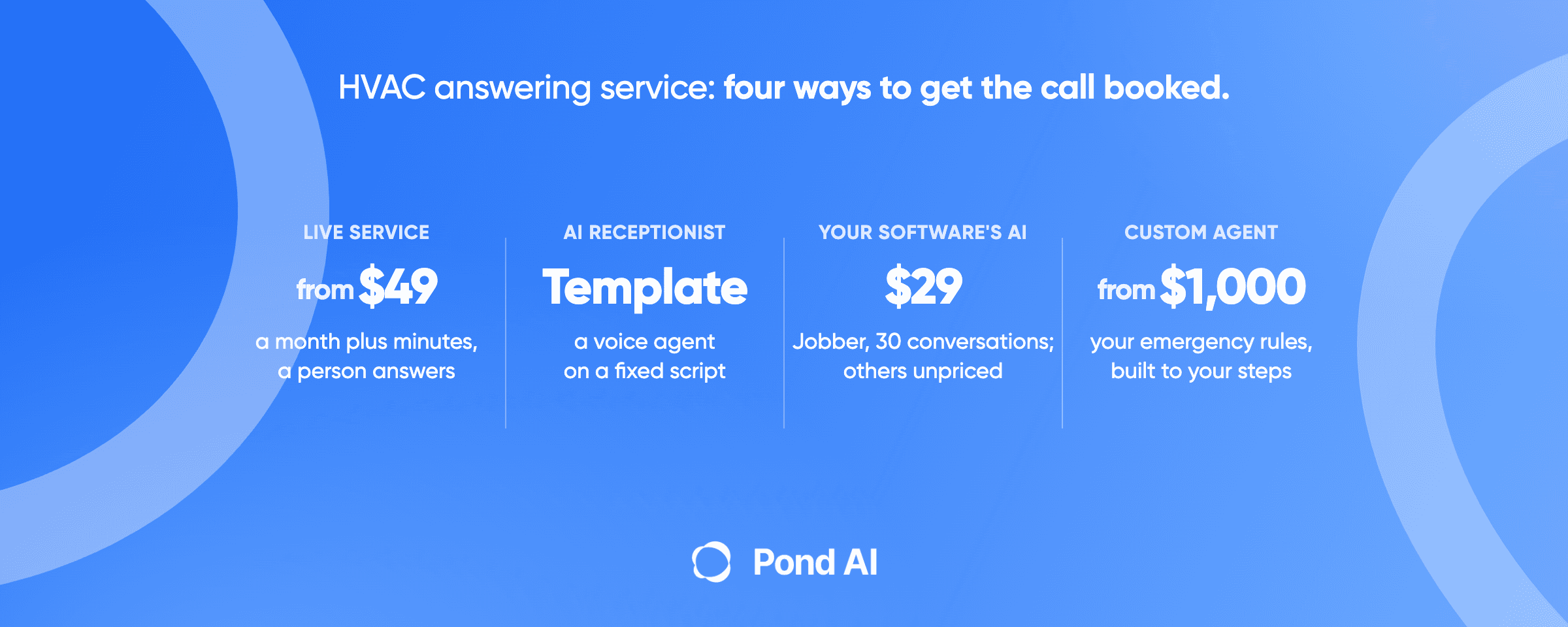
The four routes at a glance
| Route | Who answers | Books into your software? | Published price | Best for |
|---|---|---|---|---|
| Live answering service | A person follows your script | Only if the service connects. Abby Connect names ServiceTitan, Housecall Pro and Jobber; PATLive names ServiceTitan and Jobber. Neither page says what the connection writes | PATLive $49 plus $2.99 a minute, or $99 for 50 minutes; Smith.ai $300 for 30 calls; Ruby $250 for 50 minutes; Abby Connect $164 for 50 minutes | shops that want a person on every call |
| AI receptionist product | A voice agent follows a template | The pages read name no field-service software; ask before you buy | Smith.ai AI free for 25 calls, then $3.00 a call; Goodcall $79 for 100 unique customers | routine calls at steady volume |
| The AI in your field-service software | The software vendor's agent | Writes into its own system: ServiceTitan says it books "straight to the dispatch board"; Housecall Pro says it books jobs; Jobber says it creates requests and books jobs | Jobber Receptionist $29 for 30 conversations, or included on its Plus plan; ServiceTitan and Housecall Pro publish no price | shops already on that software |
| Custom agent | A voice agent built to your rules | Only if the build writes to your software and your plan lets an outside tool do it (see the API section) | Voice-platform usage of $0.07 to $0.31 a minute, plus a build from $1,000 | shops whose emergency rules, fees or slot types fit no template |
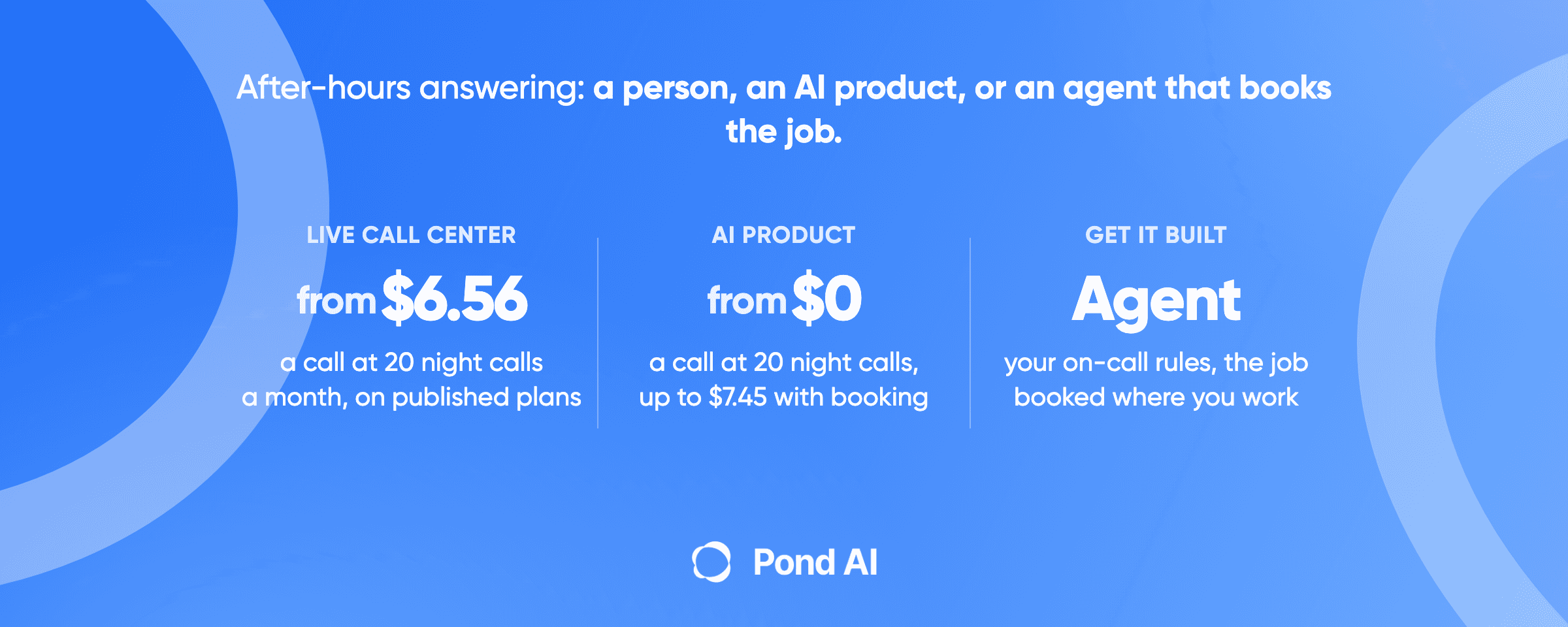
That is the page in one table. The rest of it covers what the call has to write down, what each software vendor lets an outside tool do, and a cost check at three volumes. For the plain after-hours costing (20 and 60 calls a month across a live center, an AI product and a custom agent), see our after-hours answering service guide. This post does not rebuild that table.
What the software you already run can already answer
Most "best HVAC answering service" lists skip this route. They compare services against services and never ask whether the system on your dispatcher's screen already answers the phone.
ServiceTitan. Its AI Virtual Agent is a Pro add-on built for "Contact Center Pro or any phone system". ServiceTitan says it uses real-time data such as customer records, addresses, job types and availability, confirms details and schedules jobs. The feature list includes membership greetings, recurring services, live escalation, call classification and dispatch-fee messaging. ServiceTitan publishes no price: every plan card reads Request Pricing, and pricing is quoted per technician.
Housecall Pro. CSR AI covers nights, weekends and holidays, books jobs as calls and chats come in, and runs on hours, scripts and escalation rules you set. The CSR AI page lists texts as "in Alpha" and also says "Text answering coming soon!". It states no price, and Housecall Pro's pricing page carries no CSR AI price. Housecall Pro's plans run $59 (Basic), $149 (Essentials) and $299 (MAX) a month billed annually, or $79, $189 and $329 billed monthly, and the cards do not say which plan carries CSR AI.
Jobber. The Receptionist handles calls, texts and website chat, creates requests, books jobs, cancels and reschedules, and escalates to a team member by keyword. It is included on the Plus plan with unlimited usage. On select other plans it is $29 a month with 30 conversations, then $0.79 for each extra one. Jobber still requires a dedicated phone number, though you can keep using an existing number.
When is that enough? For a shop on Jobber with a plain rota, often. A $29 add-on that books into the system you already use is hard to beat, and a custom build starts from $1,000. The same goes for a ServiceTitan or Housecall Pro shop whose quote comes in reasonable. We cannot compare cost across the three, because only Jobber publishes a price. Get quotes from the other two before you decide anything.
The software's own agent stops being enough when your rules do not fit the product's settings. Examples: an emergency list that differs by crew, a dispatch fee that depends on the time of day, or a hand-off to an on-call technician that has to follow a rota the software does not hold. That is where a service or a custom build earns its place.
What a booked HVAC call has to capture
Every vendor will tell you it "books the job". Hand this list to any of them, or to a builder, and ask which fields it fills. It is our own synthesis; no source we read prints one list. It draws on the fields in ServiceTitan's booking call, Jobber's request and job records, ServiceTitan's feature list and the way the top-ranking answering-service pages describe emergencies.
- Emergency or routine. One flag, set by a rule you wrote down. The pages we read agree that no-heat and no-cool calls count as emergencies and go to the on-call technician by text, page or patch. What counts is your call: Abby Connect says you define what counts as an emergency, and Smith.ai lists gas leak, no heat, flooding and sparking as example keywords.
- A safety flag. Did the caller mention a gas smell, a carbon monoxide alarm or symptoms? See the next section.
- Name and a callback number.
- The service address, with the unit, matched to an existing customer record where there is one.
- New customer or existing, and whether they hold a service agreement. ServiceTitan's agent lists membership greetings and its booking call carries a first-time-client flag.
- Job type. Repair, tune-up, install estimate, recurring maintenance.
- What the system is doing, in the caller's words, plus the equipment if they know it.
- Priority and an arrival window. ServiceTitan's booking call takes a priority; Jobber's request and job records carry an arrival window.
- Dispatch fee quoted and accepted before anyone drives out, where your shop charges one. Pond's own after-hours guide makes this point for emergency calls, and ServiceTitan's agent lists custom dispatch-fee messaging.
- Where the record landed and who was paged, with a transcript or summary attached.
One caution on the word "booked". ServiceTitan's CRM booking call creates a booking, a lead-like record, not a dispatched job. Ask whether an agent creates the booking or the job, because your dispatcher treats them differently.
The carbon monoxide and gas rule is yours to write
A script for these calls has to come from sources, and ours are narrow. The U.S. Consumer Product Safety Commission says: "If you suspect CO poisoning, get outside to fresh air immediately, and then call 911." It lists headache, dizziness, weakness, nausea, vomiting, sleepiness and confusion as symptoms. The CDC says gas- and oil-burning furnaces produce carbon monoxide, and that people who are sleeping can die from it before they have symptoms. The EPA names leaking chimneys and furnaces among the sources. That line is for suspected CO poisoning, not for an alarm on its own. For a caller who reports those symptoms, the agent's first line is the CPSC's, and the booking comes after. For a caller who reports only an alarm, the CPSC's instruction is: "If the alarm signal sounds do not try to find the source of the CO: Immediately move outside to fresh air. Call your emergency services, fire department, or 911."
Gas smell is different. We looked for a gas-utility or federal page with caller instructions and could not confirm one, so we do not state a gas-leak instruction here as sourced. Your shop writes its own gas-smell rule, checks it against your local gas utility, and routes that call to a person. Do not let any vendor's template decide this for you.
Daytime overflow and the busy-season phone
Nights are the obvious case. They are not the only one. In the busiest week of the year every line is busy at 10 a.m., and the call that rolls to voicemail is a customer the next shop answers. Overflow is a standard use of these tools: ServiceTitan's Contact Center Pro page says its AI Virtual Agents handle overflow and after-hours calls, and Housecall Pro lets you set the hours the agent covers. Jobber's Receptionist keeps separate phone and text greetings.
We found no solid figure for how many calls an HVAC shop loses in a peak week, and the vendor claims we saw trace to no study, so this post prints none. Count your own. Pull the phone log for your busiest week and tally the calls that went unanswered or to voicemail, then price what one booked tune-up or repair is worth to you. That number decides how much overflow help to buy. For the text-back side of a missed call, see our guide to missed call text back, and for why the first minutes matter, speed to lead.
Can a custom agent book straight into your software?
This is the part vendors skip, and it decides whether a custom route is open to you at all. An agent that only answers and emails a summary is a message service. Booking into the software needs the software's API, and each vendor sets its own terms.
- ServiceTitan. Its developer site lists two allowed paths. Certified Apps are built by a third party and reviewed by ServiceTitan. Customer-Built Apps are created, hosted and maintained by the customer with the customer's own App Keys, and the page says to "Ensure you are on the Works or Ent Plus package." A third path is listed as Not Allowed: Tunneled Apps, where a third-party application the customer does not own or control is handed the customer's App Key. Before you pay anyone to build against ServiceTitan, ask which of the allowed paths the build uses.
- Housecall Pro. Its API documentation says it is available to "any Pro on the MAX or XL Plan". Its help article says "API is available only to Pros on a MAX plan." The two pages disagree, so ask Housecall Pro which plan you need. MAX is $299 a month billed annually, $329 monthly. A shop on Basic or Essentials should assume it needs an upgrade.
- Jobber. The API uses OAuth 2.0 rather than API keys, and a company admin authorizes each app. Custom integrations are private connections built for specific accounts, with "No review process required unless connecting to more than 5 paying Jobber accounts." Jobber's pricing page lists an "API Tour with API Access" under Additional Features, so check what your plan includes.
In all three, the software's own agent skips the access question. That is another reason to test it first.
What it costs at 30, 60 and 100 calls a month
The after-hours guide already prices 20 and 60 calls across three routes. This table adds something different: the software route against a per-call AI product, at higher volumes, with a person and a custom agent's usage noted underneath for scale. The assumptions are ours. One call or text counts as one Jobber conversation, a call runs 3 minutes, and each cell prices the cheapest plan the vendor prints that covers the volume. Jobber's Plus plan, which includes the Receptionist, is not priced here.
| Calls a month | Jobber Receptionist add-on | Smith.ai AI Receptionist |
|---|---|---|
| 30 | $29 | $15 |
| 60 | $52.70 | $105 |
| 100 | $84.30 | $212.50 |
How each cell is built:
- Jobber: $29 covers 30 conversations. At 60, $29 plus 30 extra at $0.79 is $52.70. At 100, $29 plus 70 at $0.79 is $84.30. The dedicated phone number Jobber requires is not priced here.
- Smith.ai AI: 25 calls are free, then $3.00 each. At 30 calls that is $15. At 60 it is $105, below the $150 Pro plan. At 100 calls the cheapest cover is the Pro plan: $150 for 75 calls, plus 25 extra calls at the $2.50 extra-call rate the page prints for that plan, which is $212.50. That beats the free tier's per-call rate ($225) and the 150-call Pro tier, which the page prints at $1.80 a call ($270 for 150 calls, our multiplication).
- A person for scale: Smith.ai's human Starter plan is $300 for 30 calls, which is $10.00 a call within the plan and $11.50 beyond it. Basic is $810 for 90 calls ($9.00, then $10.50) and Pro is $2,100 for 300 calls ($7.00, then $8.50).
- Custom agent: Retell AI, a voice-agent platform, prices usage at $0.07 to $0.31 a minute. At 3 minutes a call that is $0.21 to $0.93 a call. That is usage alone. It leaves out the build, which starts from $1,000, and the phone line.
Read the table for its shape. Software and AI products are cheap per call. A person costs several times more, and what you buy with it is judgment on a panicked call. A custom agent's usage is small, but its cost is the build and the care it needs afterwards. ServiceTitan and Housecall Pro are not in the table because neither publishes a price.
When a custom agent is the right route
Choose it when none of the first three routes can hold your rules, or when the rules matter more than the monthly bill. Examples:
- Your emergency list changes by season or crew, and a template cannot hold the difference.
- A dispatch fee has to be quoted and accepted before the page goes out, and the wording is yours.
- The on-call technician is chosen by a rota that lives in a spreadsheet outside your software.
- You want one agent that handles the phone and sorts the call, then leaves your dispatcher a summary and the fields in the checklist.
Pond builds AI receptionists and answering services as custom agents. Custom AI agent builds start from $1,000, usually take 1 to 2 weeks, and come with a 7-day refund that applies only to custom builds. Pond's home page FAQ says: "Yes, your agent can work with your CRM, email, spreadsheets and other tools." A custom agent books into field-service software only where that software's API access allows it (see the API section above), so ask any builder, us included, to name the system it will write to, the plan it needs, and to show a test booking before you pay. If you would rather build your own, Pond's agent development page lists a Free plan at $0 billed by usage, Build at $100 a month plus usage, and Scale at $200 a month plus usage. For the buy-or-build question in general, see build vs buy for AI agents. For the wider market of AI answering products, see our AI answering service comparison.
Which route fits which shop
The route follows the software you run. A shop on ServiceTitan Pro or Housecall Pro tests the software's own agent first. A shop whose on-call rota, fees or slot types fit no template is the custom case.
- On Jobber: switch on the Receptionist and read two weeks of calls before spending more. Move on if the emergency rule does not fit.
- On ServiceTitan Pro or Housecall Pro: ask for a quote on the software's agent and test it against the checklist above.
- No field-service software, or one with no agent: an AI receptionist product for routine calls, a live service for emergencies, or both.
- Rules no product holds: a custom agent, scoped to the fields in the checklist.
You can mix routes. A person for the emergency tier and an agent for everything else is a reasonable split.
Frequently asked questions
Does Housecall Pro have an AI receptionist?
Yes. Housecall Pro's CSR AI answers calls and chats, covers nights, weekends and holidays, and books jobs, with hours, scripts and escalation rules set by the owner. The page lists texts as in alpha and also as coming soon. Housecall Pro publishes no CSR AI price on the pages we read, so ask for a quote.
Does ServiceTitan have an AI answering agent?
Yes. The AI Virtual Agent is a Pro add-on built for Contact Center Pro or any phone system. ServiceTitan says it books straight to the dispatch board, greets members and escalates to a live person. ServiceTitan publishes no price: every plan card reads Request Pricing and pricing is quoted per technician, so ask for a quote.
How much does Jobber's AI receptionist cost?
It is included on the Plus plan with unlimited usage. On select other plans it is an add-on at $29 a month for 30 conversations, then $0.79 for each additional conversation. A dedicated phone number in Jobber is still required.
How much does an HVAC answering service cost?
On the plans we read on November 13, 2026, a live service starts at $49 a month plus $2.99 a minute at PATLive, or $99 for 50 minutes, and Smith.ai's human plans run from $300 for 30 calls. AI receptionist products start free (Smith.ai AI: 25 calls, then $3.00 a call), and Goodcall's entry plan is $79 for 100 unique customers. A software add-on can be $29. Per call, Smith.ai's human plans work out to $10.00 (Starter), $9.00 (Basic) and $7.00 (Pro) within the plan. Cost depends on the unit each vendor bills, so work out your own cost per call.
Is an AI receptionist worth it for an HVAC company?
It is when the calls are routine and the booking lands in your software. It is not a replacement for a person on a suspected carbon monoxide poisoning call or a gas smell: route those calls to a person, under a rule your shop writes and checks locally. Count your missed calls in your busiest week first, then price what each is worth.
What should the agent say to a caller who smells gas?
We could not confirm a sourced gas-leak instruction, so we do not print one. Write your own gas-smell rule, check it with your local gas utility, and send that call to a person. For suspected CO poisoning, the CPSC says to get outside to fresh air immediately and then call 911.
Can a custom agent book jobs into ServiceTitan, Housecall Pro or Jobber?
Only if the software lets an outside tool do it. ServiceTitan lists a Customer-Built App path on the Works or Ent Plus package and does not allow Tunneled Apps. Housecall Pro's API is a MAX feature, and its own pages disagree on whether XL has it too. Jobber uses OAuth and a company admin approves each app.
Get an HVAC call-handling agent built
If your calls follow rules no template holds, Pond can build a custom agent that answers, sorts emergencies from routine, and captures the fields in the checklist above. Custom AI agent builds start from $1,000, usually take 1 to 2 weeks, and come with a 7-day refund that applies only to custom builds.
If your team wants to build its own agent with ready-made tools, Try Pond. If you want Pond's team to build, run and maintain the agent for you, Get a custom AI agent.