Here is what a plumbing answering service should leave behind when a sewer backs up into a finished basement late at night:
- Lane: dispatch tonight
- Water status: caller told to stop running water and flushing
- Access: finished basement, side gate
- Alert: on-call plumber texted with the address and a callback number
A voicemail heard in the morning leaves none of that.
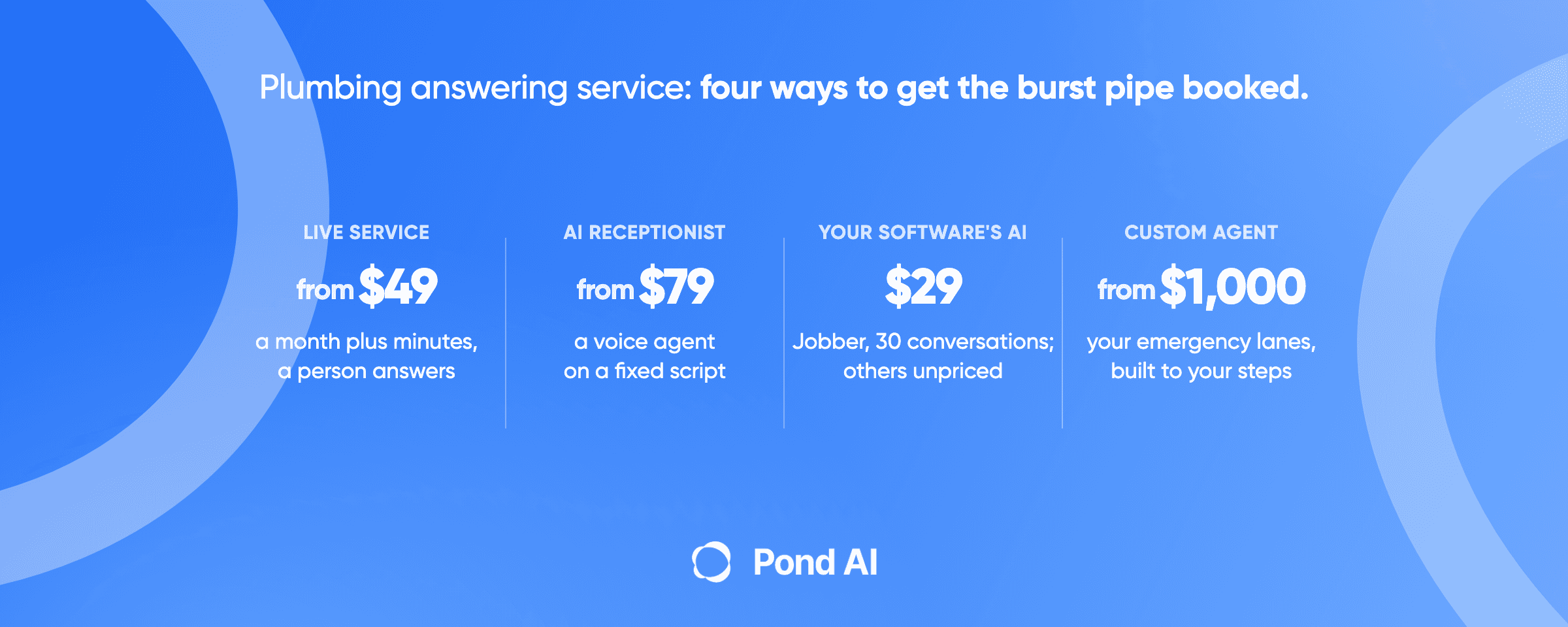
Short answer: A plumbing answering service has one job: turn every call into a usable job record, with the lane (dispatch tonight, book the next slot, or quote visit), the service address, a callback number and whether the water is off. In 2026 there are four ways to get that: a live answering service, an AI receptionist product, the agent built into your job software, or a custom agent. Test the software's own agent first.
Four routes priced at 120 calls a month
Prices only mean something at one volume, so this table uses a single one: 120 calls a month at about 2.5 minutes each, which is about 300 minutes. PATLive's own pricing page pairs 300 minutes with "about 120 calls", so the ratio is the vendor's. The arithmetic is ours, from each vendor's monthly list price, in USD, before tax.
| Option | Who answers | What lands in the job record | Monthly cost at 120 calls | Who it suits |
|---|---|---|---|---|
| Live answering service | Human receptionists | A relayed message, or a booking if you pay for one (Smith.ai charges $1.50 a call to book) | PATLive $479; Smith.ai human-first Basic $1,125; Ruby $1,725 (the 500-minute plan price; Ruby publishes no overage terms) | A shop that wants a person on every call |
| AI receptionist product | A voice agent from the vendor | A transcript and summary in the vendor's app; calendar booking on some plans | Goodcall $79 (up to 100 distinct callers); Smith.ai AI-first $262.50; AgentZap Starter $236.50 plus $499 setup; Local Call AI $314.50 ($297 for 250 minutes, then $0.35 a minute) | A shop that needs nights and weekends covered this week |
| Your job software's own agent | The software vendor's agent | A request or job inside the software itself | Jobber Receptionist about $100 on the add-on (see below); ServiceTitan, Housecall Pro and Workiz print no price | A shop already running Jobber, ServiceTitan, Housecall Pro or Workiz |
| Custom agent | An agent built for your shop | The fields your rules ask for, written into the tools you already use | Build from $1,000; ask for the running cost in the consultation | A shop whose rota, lanes or software the products cannot follow |
The Jobber figure assumes each call is one conversation: $29 covers 30, and the other 90 cost $0.79 each, so about $100 in all. On Jobber's Plus plan the Receptionist is included with unlimited usage.
The plumbing call record: eight fields
This checklist is our own derivation, a spec for what a plumbing call must write into the job record. It is built from what Jobber's Receptionist shows on each conversation (client name, phone number, property address, summary, recording and transcript), from Jobber's escalation rules, and from what ServiceTitan's API lets an outside tool create, which is a booking. A call that ends without these fields leaves the dispatcher calling the customer back to ask again.
- Lane. Dispatch tonight, book the next slot, or quote visit.
- Service address, confirmed back to the caller, plus the city.
- Callback number, read back digit by digit.
- Problem type, in the caller's words and in yours: burst pipe, sewer backup, frozen pipe, leaking water heater, no water, slow drain, replacement quote.
- Water status. Is the main shut off, and does the caller know where it is?
- Access notes. Gate code, pets, a finished basement, a crawl space.
- On-call alert. Was the on-call plumber texted or the call transferred, and at what time?
- Outcome. Jobber's own tags are a good model: request created, assessment scheduled, job scheduled, took a message, call escalated.
Fields five and six are the ones general answering scripts skip, and they are the plumbing fields. A dispatcher can price and staff a burst pipe very differently once they know the water is already off and the leak is in a finished basement.
Three kinds of plumbing call, three different endings
Most plumbing calls fall into one of three lanes, and each one should end differently.
Dispatch tonight. Water is moving where it should not: a burst pipe, an active leak through a ceiling, a sewer backup, a water heater tank leaking onto the floor, a frozen pipe that has split, or no water at all. The record matters less than speed here. The agent confirms the address and callback number, gives the caller the safety step for that problem, and texts or transfers to the on-call plumber.
Book the next slot. A slow drain, a dripping faucet, a running toilet. Nobody needs to be woken up. The agent books the first open slot and sends a confirmation.
Quote visit. This is the lane most answering setups miss. A caller whose water heater has just failed may be calling about an emergency, but the job behind it is a replacement. Water heater replacement, repipe and sewer line replacement are quote jobs rather than dispatches, and so is a tankless conversion. An emergency-versus-routine script has no third option, so a replacement can get logged as a service call and priced as one. Add a question to the script: "Is this the first time, or has it happened before?" A repeat sewer backup or an old heater is a sales lead, and the record should say so, so the owner or estimator calls back rather than the night tech.
What the agent should tell the caller
The caller is often standing in water. A good answering setup gives one clear step before it collects anything else, and every step should come from a source the owner is willing to stand behind.
Burst pipe or active leak. Ask whether the caller can shut off the main water valve and whether they know where it is. That is plain practical advice, and you should write the exact wording yourself. Decide whether the agent walks the caller to the valve or only asks the question.
Sewer backup. Tell the caller to stop adding water. Roxborough Water & Sanitation, a water utility, puts it plainly: "Don't run any more water, use the toilets or send any water down the drain." The same page says a sewer backup is contaminated and may contain bacteria and viruses that can affect health.
Frozen pipe. No flame. Thaw with electric or hot-water heat, per the American Red Cross frozen-pipe guidance, which lists what not to use: "Do not use a blowtorch, kerosene or propane heater, charcoal stove, or other open flame device." The same guidance says to call a licensed plumber if the pipe will not thaw or the frozen section cannot be found or reached, which is the booking.
Gas smell. This call is not a booking. Gas utilities such as NW Natural tell people to leave first. NW Natural's page says to leave no matter what, and not to use a phone or any battery-powered device, and not to flip a light switch on or off. It also says to leave immediately, then call 911 and its 24-hour emergency line. Peoples Gas in Chicago says to leave the area immediately and call its own emergency number, and lists 911 for carbon monoxide. So the agent's only job is to tell the caller to leave immediately, then call 911 and the emergency number their own gas utility publishes, and to end the call. It should not take an address for a visit. Write that script yourself and test it before anything goes live.
Check your job software's own receptionist first
Before buying a separate service, test the agent your job software already sells. It writes into the same system your dispatcher reads, which removes the copy-and-paste step that loses details.
Jobber. Jobber's help center says the Receptionist "is included on the Plus Plan with unlimited usage" and "can be added-on to select plans for $29 per month, which includes 30 conversations", with each extra conversation at $0.79. It needs a dedicated Jobber phone number; your existing business number can forward to it. The owner sets escalation terms such as "emergency" or "urgent", and picks either a text with a transcript snippet and a callback link, or an immediate transfer to an escalation contact. One warning: Jobber's own academy page quotes a different figure, "starts at $99/month". Confirm the price in your account before you budget.
ServiceTitan. The AI Virtual Agent page says it can "Book straight to the dispatch board with a real-time, unified knowledge of technician availability" and can recognize when a live person is needed and transfer the call. It also promises "AI-generated summaries and transcripts for every call and every job booked." The page prints no price.
Housecall Pro. Its CSR AI is "sold separately" and described as "a paid feature that can be enabled". No price on the page.
Workiz. Workiz lists AI Answering as a dispatcher "that books or reschedules jobs", and its Genius Answering page says it can "Book jobs right into your Workiz account." The pricing page lists it as sold separately with no price.
Run a test week. Call the number yourself after hours with a sewer backup, a frozen pipe, a gas smell and a water heater replacement, then open the job record each one produced. If all four come out in the right lane with the right fields, you may not need anything else.
What an outside tool can write into your software
If the software's agent falls short, the next question is whether an outside agent can write into the same system. ServiceTitan's CRM API documents an endpoint that "Creates a booking for a booking provider", so an outside agent can land a booking there. Housecall Pro's API docs list "Create jobs or get job information", but access sits on the top plans: the docs name MAX or XL, while the help center says MAX only. Check your plan before anyone quotes you an integration. Our guide to AI agent integration covers the questions to ask.
What the vendor pages add
The table carries each vendor's cost at 120 calls. These are the plan names, terms and setup fees it leaves out, read on each vendor's own pricing page, monthly billing, USD. AnswerForce and CallCenterUSA both rank for plumbing answering, but neither showed a readable price on its own site, so neither is costed here.
Live answering services
- PATLive prices by the minute: $49 a month pay as you go at $2.99 a minute, and the 300-minute tier is $1.89 a minute over. It describes every plan as "100% US receptionists" and "24/7 human answering", with no contracts and a 14-day free trial.
- Smith.ai human-first is priced per call: Starter $300 for 30 calls, Basic $810 for 90, Pro $2,100 for 300. No setup fees, month to month.
- Ruby sells receptionist minutes: 50 for $250, 100 for $395, 200 for $720, 500 for $1,725. There is no 300-minute plan and no overage terms are published, so $1,725 is the 500-minute plan price, not the cheapest way to cover 120 calls. Ruby lists plumbers among the home-service businesses it serves.
- Abby Connect sells "Abby Minutes" that cover human and AI answering; a minute of AI uses half a minute. Starter is $164 for 50, Professional $599 for 200, Growth $1,380 for 500.
AI receptionist products
- Goodcall bills per unique customer rather than per minute: Starter $79 for 100 unique customers, Growth $129 for 500.
- Smith.ai AI-first has a free tier with 25 calls, then Pro at $150 for 75 calls or $270 for 150. Extra calls on the 75-call plan are $2.50 each, so 120 calls cost $262.50. Its Hybrid plan mixes AI and live agents from about $2.50 a call.
- Local Call AI sells a plumbing plan at "$297/month flat, 250 minutes included", with no contract and $0.35 a minute after that.
- Rosie is $49 for 250 minutes, or $149 for 1,000 minutes on the Scale plan, which adds direct calendar booking and live transfers.
- AgentZap has a $499 setup fee on its $109 plan for 150 minutes; the $295 Professional plan for 450 minutes waives it on a 6-month term.
- AnswerCare sells plumbing plans from $500 a month plus $497 setup, with no per-call fees.
- Retell AI is a developer platform at $0.07 to $0.31 a minute. That price buys the voice platform. It does not buy a finished receptionist: the plumbing script, phone numbers and booking logic are yours to build.
A spread this wide says the products are selling different things. A $79 agent and a $2,100 human team are not two prices for one service. Pick on what lands in the job record first, then compare price inside that group.
When a custom agent is the better route
A product is the right answer when its rules fit your shop. A custom agent earns its build cost when they do not. Three signs point that way:
- Your on-call rota has rules a product cannot hold, such as one plumber for sewer calls, another for water heaters, and the owner for anything a commercial customer reports.
- Your quote lane matters. You want replacement and repipe leads routed to the estimator with the history question answered, instead of logged as a service call.
- Your software's own agent is missing or does not fit, and you need an outside agent to write bookings in through an API your plan includes.
Pond is the AI engineer, and it builds AI receptionists and answering services as custom agents. Custom AI agent builds start from $1,000, usually take 1 to 2 weeks, and come with a 7-day refund that applies only to custom builds. The agent works with CRM, email, spreadsheets and other tools. A build starts with a 30-minute consultation, which is where you bring the eight-field record above and your rota. If you would rather build it yourself, Pond's other route is to build your own agents. The trade-offs between the two are in our build vs buy guide.
Picking a route by how your shop runs
- A one- or two-truck shop on Jobber: start with Jobber's Receptionist and set "emergency", "burst" and "sewer" as escalation terms.
- A shop on ServiceTitan, Housecall Pro or Workiz: get the price of the built-in agent from your account rep and run the four-call test week before buying anything else.
- A shop that wants a person on every emergency: a live service such as PATLive or Smith.ai, with the gas-smell script written by you.
- A shop with no job software yet: an AI receptionist product covers nights fast; missed-call text back covers the calls it drops.
- A shop where replacement work drives the year: a custom agent with a quote lane.
Heating and cooling shops face a different call mix; our HVAC answering service guide covers their routes. For home services in general after dark, see the after-hours answering service guide.
Frequently asked questions
How much does a plumbing answering service cost?
At 120 calls a month (about 300 minutes), live services run from $479 (PATLive) to $1,725 (the price of Ruby's 500-minute plan). AI receptionist products run from $79 (Goodcall, up to 100 distinct callers) to $236.50 plus a $499 setup fee (AgentZap Starter), $262.50 (Smith.ai AI-first) and $314.50 (Local Call AI).
Does Jobber have an AI receptionist for plumbers?
Yes. Per Jobber's help center, the Receptionist is included with unlimited usage on the Plus plan, or added to select plans for $29 a month with 30 conversations and $0.79 for each extra one. Its academy page quotes $99 a month, so confirm in your account.
Can an AI receptionist book jobs into ServiceTitan or Housecall Pro?
ServiceTitan's own Virtual Agent books straight to the dispatch board, and its CRM API documents an endpoint that creates a booking, so an outside tool can land one there. Housecall Pro's API can create jobs, but its help center says access is MAX plan only while its API docs say MAX or XL, so check your plan first.
What should an AI receptionist say to a caller who smells gas?
Leave. Gas utilities such as NW Natural tell people to leave immediately and not to use phones or switches, then call 911 and the utility's emergency line. Peoples Gas in Chicago says to leave the area immediately and call its own emergency number. The agent should tell the caller to leave, then call 911 and their gas utility's emergency number, then end the call. It should not book a visit.
What should a caller do about a frozen pipe before the plumber arrives?
Never use a flame. The American Red Cross says to thaw with electric or hot-water heat, never a blowtorch, propane heater or other open flame, and to call a licensed plumber if the pipe will not thaw or cannot be reached.
Is an AI receptionist worth it for a plumbing business?
It is worth it if what it writes into the job record is usable without a callback. Test the software's own agent first, then price a product or a custom agent against the eight-field record rather than against the cheapest monthly fee.
What is the best phone answering service for a small plumbing business?
The best fit is the service that writes the lane, address, callback number and water status into the system your dispatcher already reads. For most small plumbing shops that means testing the job software's own agent first, such as Jobber's Receptionist, before paying for a separate service. If your rota or quote lane does not fit a product, a custom agent from $1,000 is the other route.
Get a plumbing answering agent built
Bring your rota, your lanes and the eight fields, and Pond will scope an agent to write into the tools you already run where their API access allows it. That access can depend on your plan: Housecall Pro's API, for example, is for its top plans. Custom AI agent builds start from $1,000, usually take 1 to 2 weeks, and come with a 7-day refund that applies only to custom builds.
Get a custom AI agent or Try Pond to build your own.