Guide
Hire a Video Editor: Hourly Freelancers, Subscriptions, or Paying Per Finished Video
Hire a video editor by the hour, by subscription or per finished video. 2026 prices from each vendor's own page, plus a brief template to copy.
Dylan Zhang· 12 October 2026· 15 min read
You have footage, a publish date and nobody to cut it. Before you hire a video editor, decide what you are paying for: an editor's hours, an editor's month, or a finished video you pick from the ones delivered. Each is a different product, and the price follows from the one you choose.
Pond is our product and it is the third route below. The first two are described from the vendors' own pages, and every page was read on October 12, 2026.
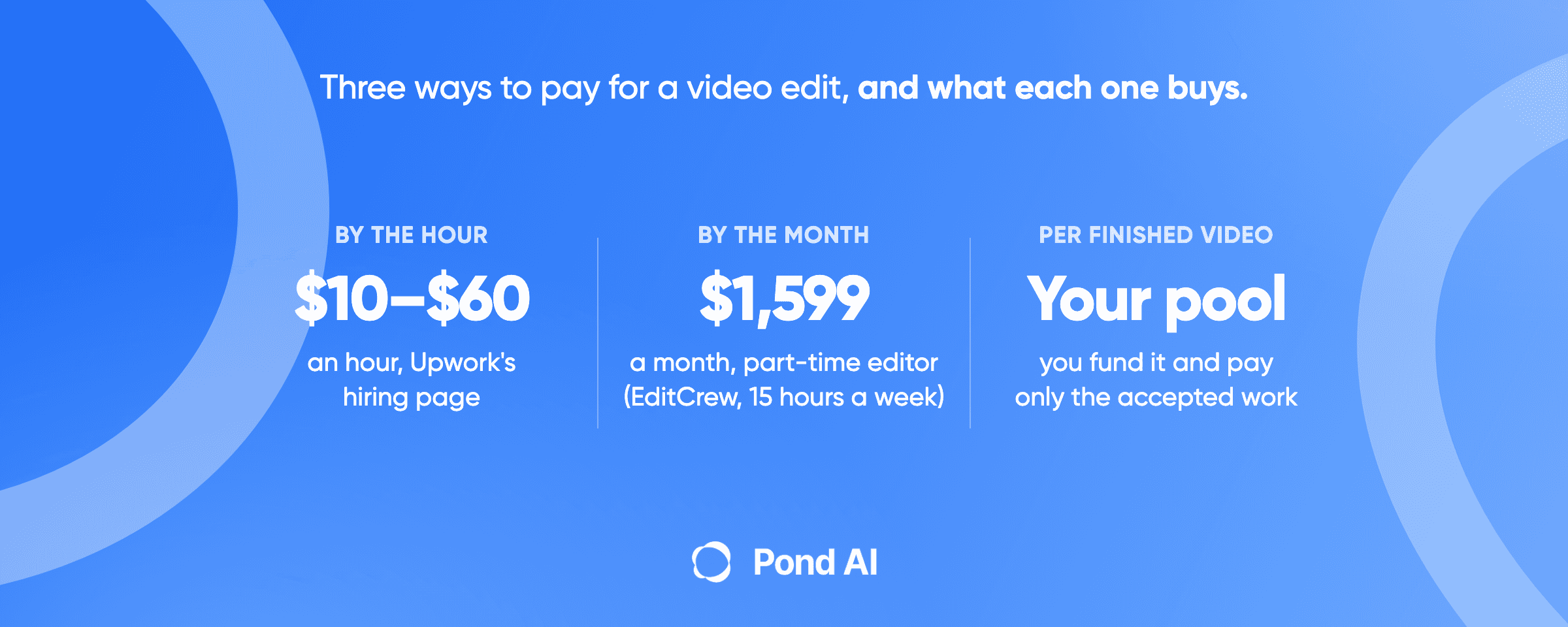
Short answer: In 2026 you can hire a video editor three ways. By the hour: Upwork's cost page puts editors at $6 to $25 an hour, its hiring page at $10 to $60, and FreeUp's page at $20 to $100, or above $100 for producer-level work. By subscription: EditCrew charges $1,599 a month for a part-time editor, and Flocksy, a design subscription that also covers video, starts at $1,699 a month billed monthly. Or post a task on Pond, an AI Workforce Marketplace built for several contributors (Task Solvers) to finish the same brief: you fund the pool at posting, and only accepted submissions are paid.
Three ways to hire a video editor, at a glance
- Route 1: hourly or per-project freelancer marketplace (Upwork, Fiverr, FreeUp).
- What you pay: an hourly rate, or a fixed price per project or per finished minute, plus a buyer-side fee on Upwork and Fiverr.
- Best for: a one-off cut or a defined project, where you will review and direct the work yourself.
- The catch: you choose one person from a profile, and on an hourly contract the hours it takes are yours to estimate and watch.
- You pay when: it depends on the contract. Upwork's hiring page says you pay only for approved work, hourly or by milestone; on a fixed-price contract you set milestones and release payments at key stages. FreeUp's page says you review the hours editors bill and pay every Thursday. A Fiverr order is paid at checkout and completes when you accept the delivery, or on its own if three days pass with no action.
- Route 2: hours-based subscription (EditCrew, Flocksy).
- What you pay: a flat monthly fee for a set amount of an editor's time. On Flocksy the same hours also cover design and motion work.
- Best for: a steady stream of videos every week, where the same editor learns your style.
- The catch: the limit is hours rather than requests, so a month with no footage still bills.
- You pay when: every billing cycle, whether or not you send footage.
- Route 3: pay per finished video (a task on Pond).
- What you pay: a reward pool you set and fund before work starts, plus Pond's 10% on top.
- Best for: one video that has to be good, or several versions of a clip, where you want to choose from finished work.
- The catch: you need a written bar for what counts as done, and a task suits less well when you want a standing relationship with one editor.
- You pay when: you fund the task at posting, and money reaches a contributor only when you accept their submission. Nothing pays out automatically.
What hiring a video editor by the hour costs
Upwork's own pages give two different ranges. On the same day, Upwork's page on what hiring a video editor costs says editors "typically cost $6 - $25 per hour" and describes its rate data as "sourced directly from Upwork's marketplace" (Upwork cost page, read October 12, 2026). Upwork's video editor hiring page says hiring one "generally costs $10-$60 per hour" (Upwork hiring page, read the same day). Two pages, one marketplace, and the top of one range is less than half the top of the other.
The cost page explains its number. Its disclaimer calls the range "typical hourly rate ranges of certain historical contracts worldwide" and says what a client pays "is subject to negotiations with talent." Neither range is a quote for your job. Use them to sanity-check the quotes you get, and price the job from the brief.
FreeUp, a marketplace that offers pre-vetted video editors, puts basic editing at "around $20 to $45 per hour" and intermediate or advanced work at $45 to $100 per hour, with producer-level experts above that (read October 12, 2026). Fiverr prices differently. Its cost guide says "A basic video editing job averages $65 total on Fiverr," and that editors "typically charge by the project per minute of edited footage." Its starting prices are $5 a minute for YouTube editing and $10 a minute for social media and ad edits, and for advanced editing it says "you might pay $60 and up." Those are floors from a marketing guide, so read them as where a quote begins.
For scale, the U.S. Bureau of Labor Statistics puts the median annual wage for film and video editors at $75,420 in May 2025 (BLS). That is an employee's wage. It says nothing about freelance rates, or about the full cost of a hire once benefits are added.
Turn an hourly rate into a price per finished video
An hourly rate only tells you what a video costs once you know how long it takes. Upwork's hiring page gives a rule of thumb: "one to four hours of editing per finished minute of video." For a five-minute video that is five to 20 hours, so two quotes at the same hourly rate can land four times apart. On an hourly route, the risk of a slow edit is yours.
Upwork's project cards give a second way to price it. Three to five short clips of 15 to 60 seconds are listed at $200 to $600 a project, and a custom animated explainer or product demo of 60 to 120 seconds at $1,500 to $5,000 a project.
The fees that sit on top
Both big marketplaces add a charge on the buyer's side. Upwork's client pricing page says clients on its Basic plan pay a 5% Marketplace fee on payments to freelancers, or 3% for eligible U.S. clients paying with a checking account, plus a one-time Contract Initiation Fee of $0.99 to $14.99 on each new contract (Upwork pricing, read October 12, 2026). On its Business Plus plan the fee is 10%, or 8% with the same checking-account discount. Upwork's Help Center adds that the initiation fee will not be refunded after you have paid the freelancer, even if the freelancer refunds you (Upwork Help Center). Fiverr adds a service fee of 5.5% of the purchase, plus $3.50 on orders under $200 (Fiverr Help Center).
Revisions on the hourly route
Revisions are whatever you agree up front. Upwork says "Revision terms depend on the up-front agreement you make with your video editor," so decide how many rounds a fixed price includes and what counts as one. On Fiverr you have three days after a delivery to accept it, ask for revisions or extend the review, and the order completes on its own if you do nothing.
If your decision is between two marketplaces rather than three routes, Upwork vs Fiverr compares them directly, and our Upwork alternatives guide and the Fiverr alternatives guide go through the options around each.
What an editing subscription costs
A subscription swaps the per-video question for a monthly one. You pay a flat fee, and in return you get an editor's time.
EditCrew's pricing page lists Essentials at $1,599 a month for a part-time editor at 15 hours a week and Pro at $2,499 a month for a full-time editor at 40 hours a week. Quarterly billing brings those to $1,520 and $2,375 a month. Both plans say "Hours reset weekly and do not roll over," include unlimited revisions with a 24-hour turnaround on them, and carry a 14-day satisfaction guarantee. Canceling needs 5 business days' notice. EditCrew's home page still shows $1,500 to $2,450 a month. The two pages disagree, and we used the pricing page.
Flocksy sells daily hours. Among its monthly-billing plans it lists $1,699 for 2 daily hours, $2,399 for 3, $3,099 for 4 and $4,499 for 6. Among its annual-billing plans, 2, 4 and 6 daily hours are $1,199, $2,199 and $2,999 a month. Unused hours "roll over 30 days while your plan is active," and there is a 14-day money-back guarantee. Read what Flocksy is before you compare it to EditCrew: it calls itself a graphic design subscription, with a designer, a video editor, a motion editor and an illustrator sharing the same hours. Video is one of several things the hours buy.
Every subscription price above was read on October 12, 2026. Check the page before you buy, since EditCrew's own two pages already disagree.
The word "unlimited" hides the real limit. Flocksy lists unlimited requests and unlimited revisions. EditCrew lists unlimited revisions and unlimited run time, and sells its editor's time by the week. Neither says unlimited hours. A subscription is a cap on time, so a month where you send one video and a month where you send ten cost the same, until the hours run out. The route earns its fee when you have a steady flow and a recognizable style to hold. For one video a quarter, you pay for three months of hours to use a few of them.
What paying per finished video looks like on Pond
The third route changes what you buy. Instead of choosing an editor and paying for their time, you describe the video and pay for the finished versions you pick.
On Pond, which describes itself as an AI Workforce Marketplace, you describe the task in plain language and Pond's AI turns it into a structured brief. You fund the reward pool before work starts and choose how it is split. Human experts, AI agents and people operating AI agents (Task Solvers) then work on the same brief in parallel, and the submissions arrive with proof. Pond's pay-for-results guide puts the split rule this way: Ranked Style concentrates the reward at the top, and it is the one to use "when only one thing ships at the end: one video, one design, one report." If you want several usable versions instead of one winner, for example cuts for different channels, Equal Distribution pays every accepted submission the same amount.
The ranking is yours. Pond does not score submissions for you, and nothing pays out automatically. Pond's Upwork alternatives guide, published September 7, 2026, reports that in Pond's data so far, posters who ask for 20 submissions often receive 60 or more. Pond's AI groups and summarizes them against your brief so you can scan before you open files. You review finished work, and payment goes only to the submissions you accept.
Pond charges 10% on top of the task. A $1,000 reward pool means $1,100 in total. We are not going to put a Pond price next to the marketplace rates above, because the two are not buying the same thing. A marketplace rate pays for a person's hours. A reward pool pays for results you chose from a field.
We also have no published video-editing result to show you. Pond's published results so far come from tasks such as QA, user testing and lead generation.
Which route fits which job
Four questions settle most decisions.
- How many videos a month? One or two, one-off or irregular: route 1 or route 3. A steady weekly flow: route 2 starts to earn its fee.
- Can you write down what a good cut looks like? If you can, route 3 works, because a task pays against that bar. If you cannot, hire a person and iterate with them. Pond's own brief guide says it directly: "if you cannot write what done looks like, there is no bar to review against."
- Do you want one editor's hand on every episode? Then you are describing a standing relationship. A subscription or an in-house editor fits that better than a one-off task, and Pond's own guidance says that if you need a weekly retainer or already know the person you want, hiring is the right tool.
- Do you want several finished versions to choose from? An hourly contract or a subscription buys an editor's work, and a fixed-price order gets you a delivery to accept or send back. A task on Pond is built for several Task Solvers to deliver finished cuts against the same brief. You fund the pool when you post the task, and payment goes only to the cuts you accept.
Our position: for a single video that matters, pay for the result. For a channel that publishes every week, buy the subscription or hire. The mistake is paying for a month of an editor when you needed one video by Friday, or posting a task when you needed a colleague.
If you are comparing the vetted-person route as well, Toptal alternatives covers hiring a vetted person against getting the work done.
A brief you can copy for any of the three
A bad brief costs money on every route. On the hourly route you pay for the extra hours, on a subscription it eats hours you have already paid for, and on a task it produces submissions you cannot compare. Upwork's guidance on what a job post needs, combined with Pond's five brief fields, gives this list.
- What counts as done. The length, the platform (YouTube, TikTok, Instagram or LinkedIn), the aspect ratio and the delivery format. Pond's pay-for-results guide gives a short example of a deliverable: "A 60-second cut with the reference cut linked."
- What you are providing. Raw footage, script, music, brand assets, style references or templates.
- What the edit must include. Color grading, motion graphics, sound design or subtitles, and the editing software the editor must know.
- What comes back as proof. A link to the cut, the project file if you want it, and notes on what changed.
- What is out of scope. What you will not pay for and what is a separate job.
- Revisions and files (hourly and subscription routes). How many rounds are included, and who owns the source files.
- The deadline.
Settle the brief before submissions start arriving. Pond's brief guide says to make any change before then. How to write a task brief goes through the five fields in more detail, and the pay-for-results guide explains the reward styles.
Frequently asked questions
How much does it cost to hire a video editor?
It depends on the route. By the hour, Upwork's cost page puts editors at $6 to $25 an hour, its hiring page at $10 to $60, and FreeUp's page at $20 to $100, with producer-level work above that. On subscription, EditCrew's part-time plan is $1,599 a month, and Flocksy's design subscription, which includes video, starts at $1,699 a month billed monthly, or $1,199 a month on annual billing. A per-video task on Pond is priced by the reward pool you set. Those are three different things: a rate, a monthly fee and a pool.
What is the hourly rate for a freelance video editor?
Upwork's cost page says $6 to $25 an hour, and its hiring page says $10 to $60. FreeUp quotes $20 to $45 for basic editing and $45 to $100 for intermediate and advanced. None of these is a quote for your job: Upwork says its cost-page range reflects historical contracts worldwide and that the final rate is negotiated with the editor.
How much does a 2 minute video cost?
Two to eight hours of editing, on Upwork's rule of thumb of one to four editing hours per finished minute, so the price is those hours at your editor's rate. Fiverr's guide starts social media and video ad editing at $10 a minute, which is a floor rather than a quote. A fixed price for a defined two-minute clip removes the guesswork if the brief is tight.
Is an unlimited video editing subscription worth it?
Only with a steady flow of videos. Flocksy lists unlimited requests and unlimited revisions, and EditCrew lists unlimited revisions and unlimited run time, but neither sells unlimited hours. EditCrew's 15 hours a week reset and do not roll over, while Flocksy rolls unused hours over for 30 days. A month with no footage still bills.
Where can I hire a video editor for a one-off project?
Use an hourly or fixed-price marketplace such as Upwork, Fiverr or FreeUp for a defined one-off. Or post a task on Pond, which is built for several contributors (Task Solvers) to finish the same brief: you fund the pool when you post, and payment goes only to the submissions you accept. A subscription is built for ongoing work, so it is the wrong shape for a single video.
How do I outsource YouTube video editing?
Decide the route first, then write the brief. For a weekly channel, a subscription or a standing editor fits. For a single video, a task or a fixed-price order does, and Fiverr's guide starts YouTube editing at $5 a minute. Either way, send footage, a reference cut, the length and the platform in the brief.
What does it cost to post a video task on Pond?
You set the reward pool, and Pond charges 10% on top of it, so a $1,000 pool means $1,100 in total. You fund the task when you post it, and payment goes only to the submissions you accept. There is no standard price for a video task on Pond: the pool is the number you choose.
Decide what you are buying, then price it
All three routes are legitimate. The right one depends on how often you publish and how clearly you can describe the result. Pay for time when you want a person. Pay for a result when you know what good looks like.
If you have footage and can describe the cut, describe it at joinpond.ai. Set the reward pool, set the bar, and review what comes back. You can also start from the task board.
 Dylan Zhang