Short answer: The best n8n alternatives in 2026 depend on why you are leaving. If the problem is running servers, n8n Cloud removes it without a rebuild. For hosted workflows, Make suits visual builders, Zapier suits teams with apps everywhere, and Activepieces gives a free plan that also counts a whole run as one credit, with AI steps costing more. For AI agents, Gumloop and Lindy are self-serve builders and Relevance AI sells through sales. If nobody on your team can build and maintain it, have the agent built.
Pond publishes this blog. Pond builds custom AI agents and offers tools to build your own. Pond is not in the comparison table or the tool reviews.
n8n alternatives at a glance
| Tool | Best for | Who hosts it | Billing unit | Entry price, as listed | Watch for |
|---|---|---|---|---|---|
| n8n Cloud (the baseline) | n8n workflows without running a server | n8n | Execution (one full workflow run) | Starter is $24 a month billed monthly, or $240 a year billed annually, for 2,500 executions a month (USD) | No permanent free Cloud plan, only a trial |
| Make | Scenarios with branches, built visually | Make | Credit (each module action) | Core is $16 a month billed monthly, or $144 a year billed annually, for 10,000 credits a month (US pricing) | Plans differ by country |
| Zapier | Teams whose apps sit everywhere | Zapier | Task (each successful action step) | Professional from $19.99 a month billed annually, or $29.99 billed monthly. Free has 100 tasks a month | The Free plan runs two-step Zaps only |
| Activepieces | A free start that counts a run as one credit | Activepieces, or you | Credit (one per run, more for AI steps) | Free is $0 for 1,000 credits a month. Plus is $20 flat per month, billed monthly | Confirm each app you use has a connector |
| Pipedream | Developers shipping integrations inside their own product | Pipedream | Usage credit | Free is $0. Startup is $99 a month billed annually, or $150 billed monthly | Priced for production apps, not internal workflows |
| Power Automate | Teams already on Microsoft's tools | Microsoft | Per user | Premium is $15.00 per user a month, paid yearly | Agents need an Azure subscription |
| Latenode | Teams that would rather pay for compute time than for runs or steps | Latenode | CPU second | Free includes 10,000 CPU seconds a month. Paid usage has no base fee | No fixed-price paid plan to compare |
| Zapier Agents (the agent baseline) | Agents inside an existing Zapier account | Zapier | Activity | Agents Pro is $50 a month billed monthly, or $400 a year billed annually, for 1,500 activities a month | Billed apart from Zap tasks |
| Gumloop | Teams building and sharing AI agents | Gumloop | Credit | Pro starts at $37 a month for 20k credits a month, with a 14-day free trial | No free plan on the page |
| Lindy | An AI employee that works inside your tools | Lindy | Credit, per active user | Team from $29.99 or $49.99 a month per active user, depending on the version of the page you see | Every active user in the workspace is billed |
| Dust | Agents built on your company's own documents and tools | Dust | Seat (each seat has monthly credits) | Pro is $30 per seat a month billed monthly, or $24 billed yearly, with 8,000 credits per seat a month (dollars in a US view; the currency follows the visitor) | Seat pricing grows with headcount |
| Relevance AI | Enterprise agent programs | Relevance AI | Not published | No public price. Enterprise only, through sales | No self-serve plan |
Prices are each vendor's own, checked November 11, 2026. Credits are not comparable across vendors: Make, Activepieces, Pipedream, Gumloop, Lindy and Dust all use the word, and each one means something different by it.
Why teams look for an n8n alternative
The first reason is the job of running it. n8n's own Docker guide is blunt about that job. "Self-hosting n8n requires technical knowledge," it says, and lists setting up servers and containers, managing resources and scaling, securing the server and configuring n8n. Then: "n8n recommends self-hosting for expert users. Mistakes can lead to data loss, security issues, and downtime."
The second reason is the license. The free Community Edition runs under n8n's Sustainable Use License, which allows use "only for your own internal business purposes or for non-commercial or personal use." The docs give the practical test: internal use is fine, as long as you are "not making n8n available to your customers for them to connect their accounts and build workflows." It is a source-available, fair-code license, not an OSI open-source license. If you want to put workflows inside your own product, that matters.
The third reason is price, and it is easy to misjudge. n8n bills Cloud plans by execution, and its FAQ says "An execution is a single run of your entire workflow." A ten-step workflow that runs once counts once. Most of the tools below count steps, module actions or seats instead. If your workflows are long and busy, switching can raise your bill.
Do you need to leave n8n at all?
If self-hosting is the only problem, n8n Cloud may be the answer. It runs the same product without a server on your side.
For a US buyer, n8n's billing provider lists Starter at $24 a month billed monthly or $240 a year billed annually, for 2,500 executions a month. Pro is $60 a month billed monthly or $600 a year billed annually, for 10,000 executions a month. n8n's pricing page shows euros to some visitors with the same digits, so check the currency before you compare. There is no permanently free Cloud plan. The Cloud trial needs no credit card and is capped at 1,000 executions.
One limit to know: n8n's FAQ says "The Business plan is currently only available for self-hosted n8n."
Leave n8n when the license blocks what you are building, when the people who built your workflows have gone, or when the job has outgrown fixed workflows and needs an agent. Otherwise, moving to n8n Cloud is the smallest change.
Hosted n8n alternatives for workflows
Make: best for visual scenarios with branches
Make bills in credits. Its pricing page says "Every time a module in a scenario performs an action, it consumes credits." The Free plan includes 1,000 credits a month. Per Make's US pricing data, Core is $16 a month billed monthly or $144 a year billed annually, for 10,000 credits a month. Plans differ by country, so check the page from your own location.
Make's plans also include "Build and manage AI Agents in Make with our AI Provider (all plans) or your own LLM key," and an MCP server that lets an AI client call your scenarios.
Not a fit for: long, busy workflows where you liked paying once per run. Make counts actions per module, so a scenario whose ten modules each perform an action uses credits at every one. Its pricing FAQ makes exceptions: the Router module and error handler modules such as Rollback and Break use no credits.
Zapier: best for teams whose apps sit everywhere
Zapier's unit is the task: "Tasks are used when a Zap successfully moves data or completes an action for you automatically." Built-in tools such as Formatter, Paths and Filters use no tasks. The Free plan gives 100 tasks a month and runs two-step Zaps only. Professional starts from $19.99 a month billed annually, or $29.99 billed monthly, on Zapier's pricing page.
Zapier's task usage rates charge a Zapier MCP tool call at two tasks, and AI steps by model tier: one task on standard models or your own model, three on advanced models and five on premium models.
Not a fit for: multi-step workflows with high volume. A run with nine action steps uses nine tasks where n8n would count one execution. Our Zapier alternatives guide covers leaving Zapier, with n8n as one of the options.
Activepieces: best for a free start that counts a run as one credit
Activepieces is the closest thing to n8n's billing model in this list. Its pricing page says "A run is one credit however many steps it has," with AI steps costing more. Free is $0 for 1,000 credits a month, with unlimited flows and up to five users, and needs no card. Plus is $20 flat per month, billed monthly, then pay as you go.
You can use the hosted cloud or run it yourself. Code outside its enterprise directories is under the MIT license, which is a looser license than n8n's.
Not a fit for: a team that has not checked its apps. Confirm that every app in your n8n workflows has an Activepieces connector before you move.
Pipedream: best for developers shipping integrations in their own product
Pipedream is a developer product. Its pricing page reads "Free to build. Pay when your integrations go to production." Free is $0 with every feature in development. Startup is $99 a month billed annually or $150 billed monthly, with 10,000 usage credits and 100 external users included. The FAQ says "Serving real external users in production requires Startup."
Not a fit for: an operations team replacing internal n8n workflows. Pipedream is priced for developers building a product, and that is a different job.
Power Automate: best for teams already on Microsoft's tools
Microsoft's pricing page for the US lists Power Automate Premium at $15.00 per user a month, paid yearly, with a 30-day free trial. Unattended bots are priced separately, with Power Automate Process at $150.00 a bot a month, paid yearly.
Agents sit outside that price. The page says "An Azure subscription is required to use agents," and points to Copilot Studio.
Not a fit for: a team whose tools are mostly outside Microsoft, or one that wants per-run pricing instead of per-user pricing.
Latenode: best for paying for runtime instead of runs
Latenode bills by compute time. Its pricing page says "Start with 10,000 CPU seconds free every month." Above that, pay as you go has no base fee and costs $0.00012 per CPU second in the 10,001 to 100,000 bracket, falling at higher volume.
Not a fit for: a buyer who needs a fixed monthly number for a budget. There is no fixed-price paid plan to compare.
n8n alternatives for building AI agents
n8n has an AI Agent node, and its docs describe it plainly: "Connect a chat model and one or more tools, and the agent decides which tools to call to complete a task." If your agents live inside n8n workflows, n8n Cloud keeps them.
The tools in this section are built around agents from the start. Use them when the job needs a judgment on each case, such as a free-text email, a lead that needs research or a support ticket. If you can write the steps down in order and they rarely change, a workflow tool from the previous section is cheaper and more predictable.
Zapier Agents: the agent baseline
Zapier sells Agents apart from Zap plans, in activities. Agents Free gives 400 activities a month. Agents Pro is $50 a month billed monthly or $400 a year billed annually, for 1,500 activities a month. If you already run Zapier, this is the agent route with the least new setup.
Not a fit for: a team that wants one bill. Agents are billed in activities, apart from the tasks your Zaps use.
Gumloop: best for teams building and sharing AI agents
Gumloop's tagline is "Build, share, optimize & control agents." Its pricing page lists Pro, which starts at $37 a month with a 14-day free trial and includes 20k credits a month, an 8% orchestration fee and unlimited seats. Enterprise is custom. There is no free plan and no annual option on the page.
Not a fit for: a team that wants a free plan to start on. The page lists only a 14-day trial of Pro.
Lindy: best for an AI employee that works inside your tools
Lindy describes itself as "the AI employee that plugs into your tools, learns how you work, and takes real work off your plate." It starts with $50 in free credits for seven days and no card. The Team plan's price depends on which version of the pricing page you see: from $29.99 a month per active user for 3,000 credits, or $49.99 for 5,000 credits. Every active user in the workspace is billed, and top-ups are $10 per 1,000 credits.
Not a fit for: a large workspace on a tight budget. Every active user is billed, so the cost grows with the number of people.
Dust: best for agents that work from your company's knowledge
Dust builds custom agents on top of your company's documents and tools, and lists connections to Slack, Notion, GitHub and Drive, plus any tool through MCP. Its pricing is per seat, and the currency follows the visitor: the page showed dollars to a US reader and euros when we read it from India. In dollars, Pro is $30 per seat a month billed monthly, or $24 billed yearly, with 8,000 credits per seat a month. Free is $0 for 500 credits, lifetime.
Not a fit for: a team that wants a flat price as it grows. Pricing is per seat, so it rises with headcount.
Relevance AI: best for enterprise agent programs
Relevance AI's home page is titled "Specialist AI Agents for Every Task." Its pricing page shows one Enterprise tier with "Talk to sales" and no self-serve price.
Not a fit for: a small team that wants to start this week. There is no self-serve plan, so you book a call first.
Skip Vellum
Vellum still appears on n8n-alternative lists, but its own home page describes "A personal AI assistant for your busywork." If a list sent you to Vellum for a workflow builder, you will not find one on vellum.ai. Its shutdown notice says its Personal Assistant Platform "is shutting down," that Vellum turns off every assistant hosted in its cloud starting November 7th, 2026, and that after December 13th, 2026 you "will not be able to log in to www.vellum.ai." Its pricing page still lists plans, so check the notice first.
Not a fit for: anyone who needs a workflow tool, or a hosted assistant that will still be running after December 13th, 2026.
If you still want to self-host
Some teams want a more open license and are happy to keep running servers. Three options:
- Activepieces. Self-host the MIT-licensed core, or move to its cloud later.
- Windmill. A self-hosted free tier from $0 a month with unlimited executions, under Apache 2.0 or AGPLv3, with enterprise features under a separate license.
- Node-RED. A flow-based tool "originally developed by IBM Emerging Technology Services team" and now part of the OpenJS Foundation, under Apache 2.0. The Node-RED project lists no hosted plan of its own, so you run it yourself. Its About page names a separate company, FlowFuse, founded to make Node-RED more accessible for enterprise use.
Run on your own servers, each one still needs the server work that n8n's docs describe.
Same workflow, different meters
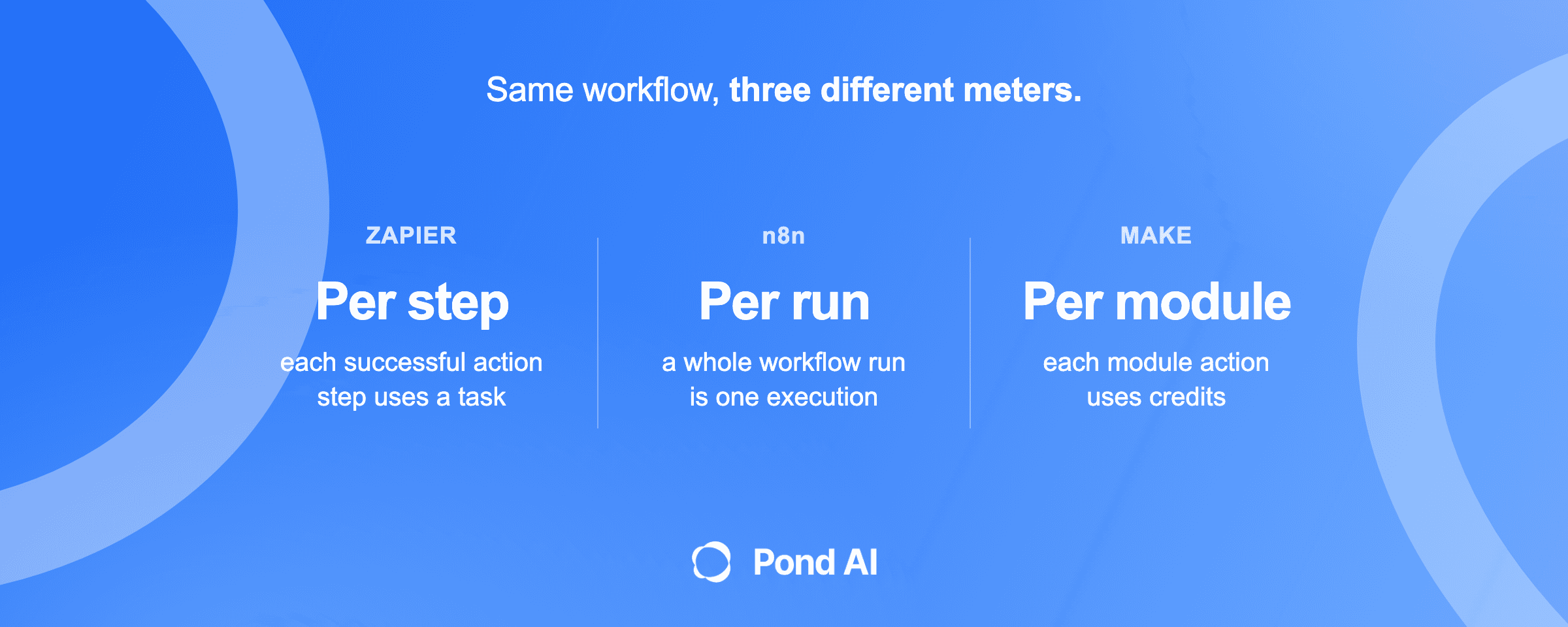
Take one workflow with a trigger and nine action steps, and count what one run costs in each tool's own unit:
- n8n: one execution, because n8n counts the whole run.
- Activepieces: one credit, because "A run is one credit however many steps it has" (AI steps cost more).
- Zapier: nine tasks, one for each successful action step. Built-in tools such as Filters use none.
- Make: a credit for each module that performs an action, with no credits for the Router or error handler modules.
- Latenode: the CPU seconds the run takes.
- Power Automate: nothing per run. Premium is priced per user ($15.00 a month, paid yearly), and unattended bots per bot (Process is $150.00 a month, paid yearly).
The pattern matters more than any one price. Long workflows favor per-run billing. Short, simple workflows with many users favor a tool whose cheapest plan covers them. Price your three busiest workflows in each tool's unit before you move anything.
When to stop building workflows yourself
Every tool above shares one assumption: someone on your team designs the logic, connects the apps and fixes the workflow when it breaks. Switching from n8n changes the bill and the editor. It does not remove that person.
Stop building it yourself when one of these is true:
- Nobody owns the workflows. The person who built them left, and nobody else understands them.
- The job needs judgment on each case. Leads to research, emails to read, tickets to route. That is agent work, and it takes testing to get right.
- The workflow is critical and nobody has time to maintain it. A broken lead or support workflow costs more than the build.
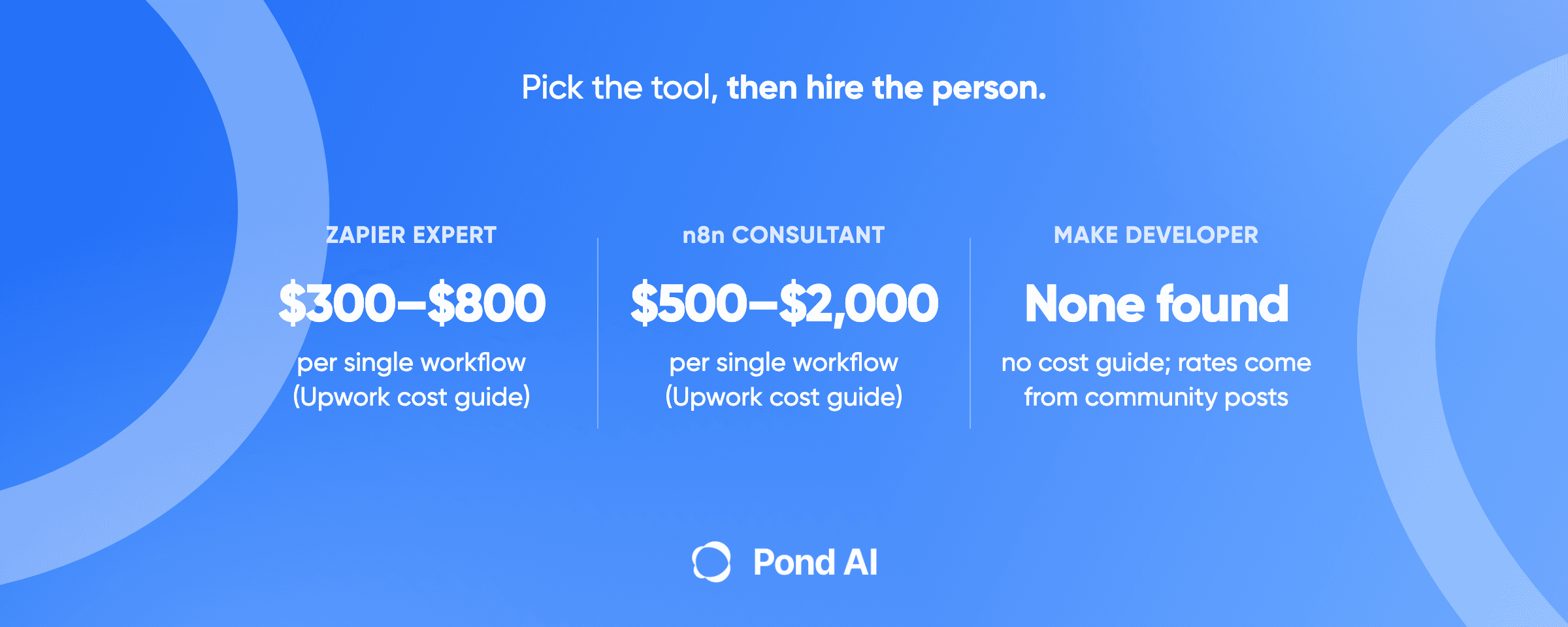
At that point you have three routes. Hire an engineer, if the agent is core to your product and you can keep someone on it. Hire an n8n or Make specialist for a defined build; our guide to Zapier expert, n8n and Make developer costs covers rates and briefs. Or have Pond build it.
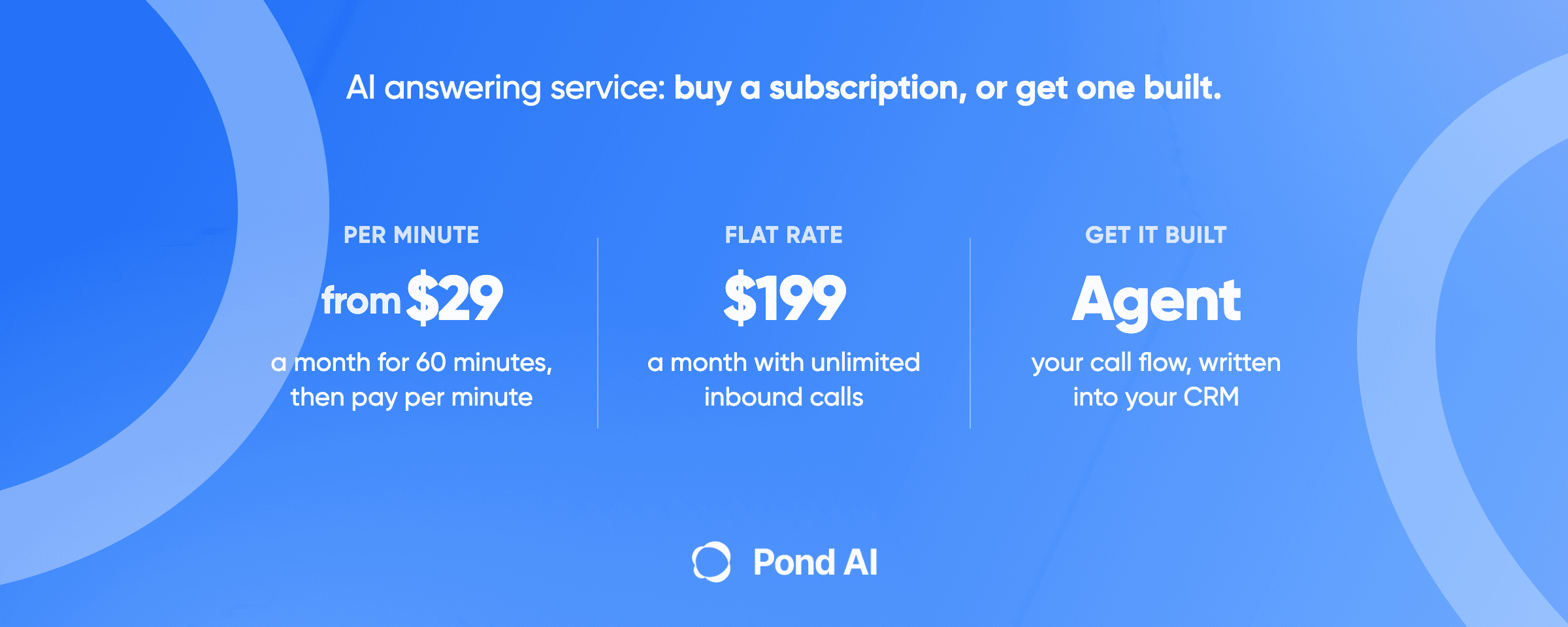
Pond's home page calls it "your AI Engineer", and says Pond "builds, runs and maintains custom AI agents for businesses." Custom AI agent builds start from $1,000, usually take one to two weeks, and are refunded within seven days "if benchmarks aren't met." Once the agent is ready, you run it from the AI your team already uses, such as ChatGPT or Claude: connect Pond once, then ask in plain words.
If you would rather build it yourself, on Pond's data, tools and infrastructure, Try Pond and describe what you need in plain language. Pond's plans are billed by usage: the Free plan starts at $0, the Build plan adds MCP support for $100 a month plus usage, and the Scale plan adds dedicated support for $200 a month plus usage.
Running automations from ChatGPT or Claude is not a Pond-only feature. Zapier and Make both offer MCP routes into AI clients. Pond's own FAQ names the gap that remains: ChatGPT and Claude "aren't connected to your CRM, inbox or data, and they don't run your process every day on their own" out of the box. An agent adds those connections, the steps your business follows, "and someone to keep it working." For a fuller comparison of the routes, see build vs buy an AI agent, and for what a custom build involves, AI agent development on Pond.
How to choose an n8n alternative
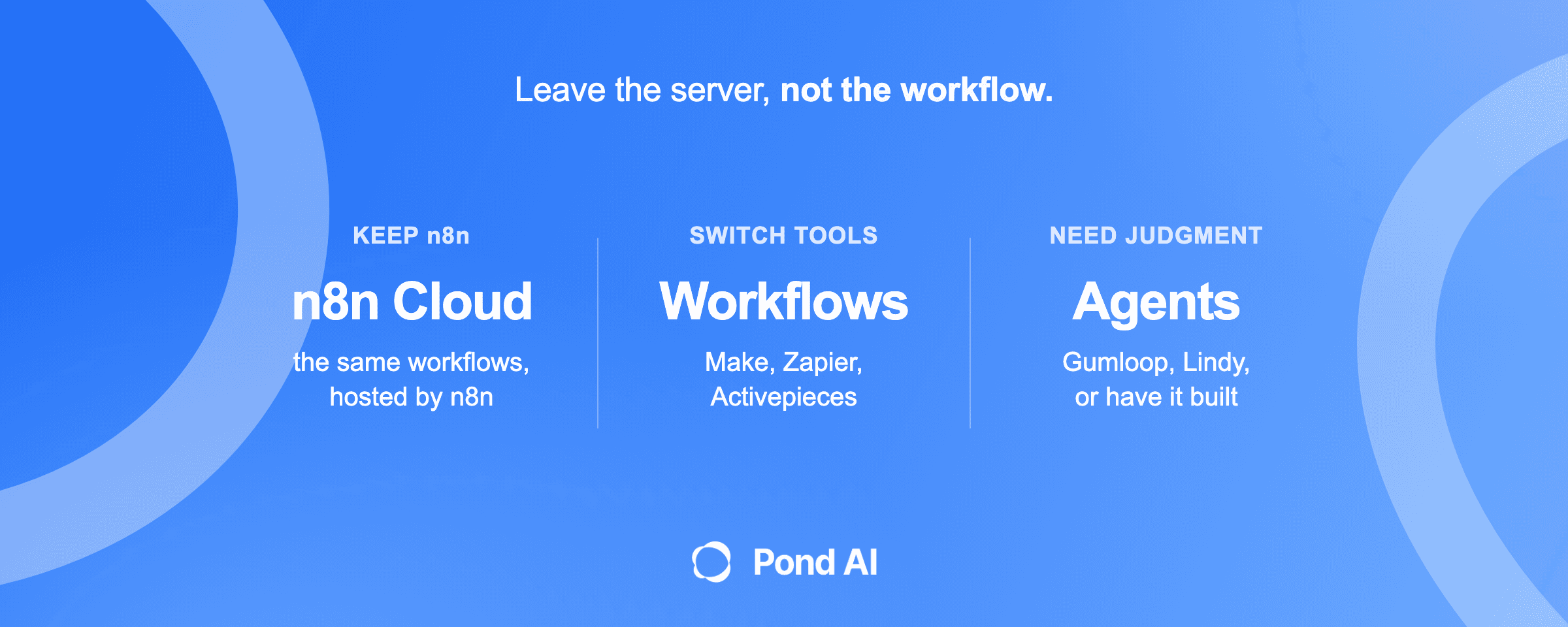
- You like n8n but not the servers: move to n8n Cloud.
- You want visual building with branches: Make.
- Your apps are spread across many vendors and your workflows are short: Zapier.
- You want a free plan and per-run counting: Activepieces.
- Your team already works in Microsoft's tools: Power Automate.
- You are a developer putting integrations inside your own product: Pipedream.
- The job needs an agent and your team will build it: Gumloop, Lindy or Dust, or Zapier Agents if you already run Zapier.
- The job needs an agent and nobody will build or maintain it: have it built.
Frequently asked questions
Can I use n8n for free?
Yes, with limits. The self-hosted Community Edition is free under n8n's Sustainable Use License, for internal business use. n8n has no permanently free Cloud plan, only a trial with no credit card. The free route trades the subscription for the work of running your own server.
Is n8n still popular?
Yes. The n8n repository on GitHub showed 210,138 stars on November 11, 2026. The repository also had 61,458 forks. In October 2025, n8n announced a $180 million Series C, bringing its total funding to $240 million at a $2.5 billion valuation. Stars and funding show interest in the product, not whether it fits your team, so weigh the license and the server work too.
Is there an n8n alternative that does not need self-hosting?
Yes. Make, Zapier, Power Automate, Latenode, Pipedream, Gumloop, Lindy, Dust and Relevance AI are hosted by their vendors, and Activepieces offers a hosted cloud. n8n Cloud is also hosted, so you can stop self-hosting without leaving n8n. Its Starter plan is $24 a month billed monthly for 2,500 executions a month, and there is no permanently free Cloud plan.
What is the best n8n alternative for AI agents?
For a team already on n8n, n8n Cloud with its AI Agent node. For a non-technical team, Gumloop or Lindy, which are built around agents. For agents that work from company documents, Dust. For an enterprise program with a sales process, Relevance AI. If nobody has time to build or maintain the agent, have it built.
How does n8n pricing differ from Zapier and Make?
n8n counts a whole workflow run as one execution, regardless of steps. Zapier counts each successful action step as a task. Make charges credits each time a module performs an action, apart from Router and error handler modules. Activepieces also counts a whole run as one credit, with AI steps costing more. The gap widens as workflows get longer, so check each tool's unit before you compare prices.
Can I have my n8n workflows built for me?
Yes. You can hire an n8n specialist for a defined build, or have an AI agent built that runs the process for you. Pond builds custom AI agents, and the section above on when to stop building workflows yourself sets out the three routes and Pond's build terms. Start there if nobody on your team has time to maintain the workflows.
Build your own agent, or have one built
If your team wants to build its own agents on Pond's data, tools and infrastructure, Try Pond and run them from ChatGPT or Claude. If you want Pond's team to build, run and maintain one for you, Get a custom AI agent.