Short answer
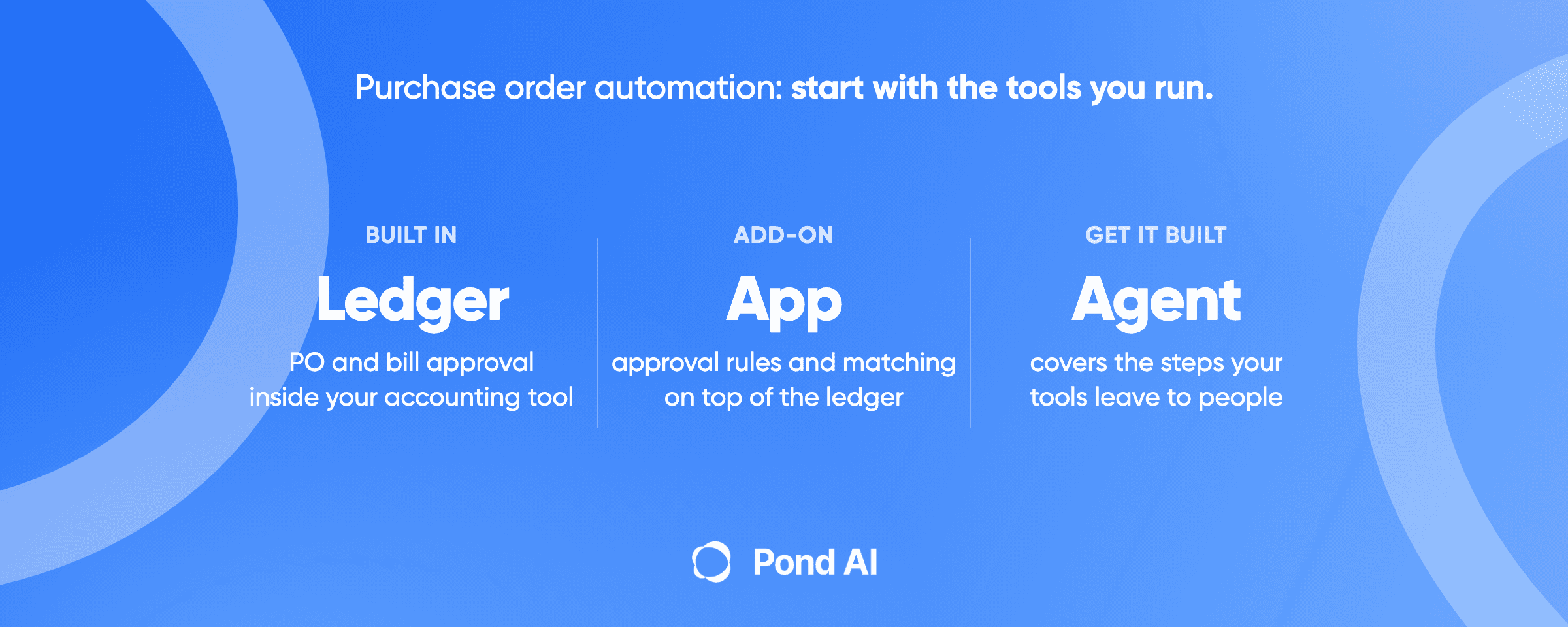
Most small finance teams on QuickBooks Online, Xero or NetSuite can automate purchase order approval without buying a new system. QuickBooks Online Advanced routes a PO by amount, vendor, payment status, location or term, Xero lets you submit a PO for approval and convert it into a bill, and NetSuite routes it by each approver's limit. The gap is matching: in the pages we read, neither QuickBooks nor Xero checks a bill against a receiving record automatically. Turn on what you already pay for, add one approval add-on if you need bill-to-PO matching, and buy an AP suite only when matching, approvals and payments all outgrow the ledger.
Disclosure: Pond publishes this blog and sells custom AI agent builds. Prices are US list prices read on October 19, 2026, from each vendor's own page.
What your accounting tool already does for purchase orders
Each line comes from the maker's own help or pricing pages. Where the maker does not say, the line says so.
QuickBooks Online
- Purchase orders: Plus and Advanced only. Intuit's help article puts it plainly: "Purchase orders are only available in QuickBooks Online Plus and QuickBooks Online Advanced."
- Approval on the PO: Advanced. Intuit's September 2022 release notes say "Admins can create PO approval flows based on amount, vendor, payment status, location, or term," and a PO that meets none of your criteria is approved automatically.
- Approval on the bill: a separate Bill Multi-Condition Approval template. Intuit's help article describes it for Bill Pay Elite customers, with up to five layers of approval. Check whether your plan includes it before you design around it.
- Matching: no automatic match in the help pages we read. Once the vendor accepts a PO, you add it to a bill or expense. If you receive inventory with Item receipts, QuickBooks can record what arrived against the PO and link the receipt to the bill, but Intuit's help leaves it to you to make sure the receipt matches the PO.
- List price: Plus is $140 a month and Advanced is $340 a month at list price, before the 50% off for 3 months promotion. Intuit's pricing page says "No annual contract" and "Cancel anytime", and its offer terms say that after the introductory period you are charged on a monthly basis.
Xero
- Purchase orders: yes, under Purchases. Xero's US pricing page has no purchase order row, so it does not say which plan includes them. Check yours, and note that Early is capped at "Enter 5 bills".
- Approval on the PO: Xero lets you Save a purchase order or Submit it for approval, and an approved order converts into a bill you can pay. Xero user roles control who can access, approve, email, and delete purchase orders.
- Approval on the bill: by role. Xero says its roles and permissions "control who can create and approve bills", and a user without payment permission can schedule a payment, which then waits for someone who has it. Xero's bill-payments FAQ says a more flexible approvals workflow is planned to launch later in 2026.
- Matching: none described. Xero's page describes copying the purchase order to a bill and editing the quantities by hand for a partial delivery, and the order stays open for the rest.
- List price: Xero's plans in the US are $27, $59 and $97 a month after the introductory offer (Early, Growing and Established).
NetSuite
- Purchase orders: native. NetSuite's AP page describes purchase requests that go to the right manager and convert to purchase orders on approval.
- Approval on the PO: NetSuite builds purchase order approval on SuiteFlow, and routing follows the purchase approval limit of each approver. The packaged Purchase Order Approval Workflow SuiteApp passes a request up the chain until it reaches someone whose limit covers the amount.
- Approval on payments: NetSuite describes "multilevel, role-based approval workflows" on vendor payments, through payment automation it runs with BILL inside NetSuite.
- Matching: yes. In NetSuite's words: "Match vendor bills to POs and receiving documents to avoid overpayments or duplicate payments and reduce the risk of invoice fraud."
- Price: NetSuite publishes no price for it: the license is an annual fee made of a core platform, optional modules and the number of users. A one-time implementation fee comes on top.
These pages were read on October 19, 2026. Plan names and prices change, so read them again before you buy.
What purchase order automation covers
IBM defines purchase order automation as using software to manage the creation, approval and tracking of purchase orders. In practice it has five parts, and a tool can cover some without the others:
- The request. Someone asks to buy something, on a form or inside the accounting tool.
- The approval. Rules decide who signs off, usually by amount, vendor or department.
- The order. The approved PO goes to the vendor.
- The bill. When the invoice arrives, the PO becomes a bill in the ledger instead of being typed in again.
- The match. The bill is checked against the PO before payment.
Matching comes in two strengths. A two-way match checks the invoice against the purchase order. A three-way match adds the receiving record. Intuit's own guide to procure-to-pay describes the control: "Compare the purchase order, receiving record, and vendor invoice before approving the invoice for payment." On QuickBooks and Xero, as their own pages describe them, a person does that step. It is where the built-in tools differ most.
Where the built-in approval stops
No source we found puts a dollar or volume line on when a team should move off its accounting tool's own approvals. The useful edges are capabilities, and you can test each one against your own month:
- You need an automatic three-way match on QuickBooks or Xero. QuickBooks Online can record an Item receipt against a PO and link it to the bill, but Intuit's help leaves the comparison to a person. Xero's pages describe no receiving record. If a warehouse sheet or a project tool confirms deliveries, neither ledger reads that confirmation.
- You need several approvers on one PO in QuickBooks. Intuit's help article for custom workflows says you can add approver groups of up to 5 per group. A QuickBooks Team reply in the Australian community from October 2024 says the PO template allows one approver per condition. The two disagree, so test it on your own company file before you promise it to anyone.
- Your Xero bill approvals need rules beyond permissions. Today Xero controls bill approval through roles. Its bill-payments FAQ says a more flexible approvals workflow is planned to launch later in 2026.
- Bills sit unreviewed. In the QuickBooks bill approval workflow, a bill that sits unreviewed for 30 days is automatically denied. That protects you from stale approvals, and it also means a vendor goes unpaid if the approver is on leave.
- Requests start outside the ledger. If people ask to buy in Slack, email or a spreadsheet, the request does not reach the ledger on its own. Someone retypes it.
If none of these describes your team, stop here and run your platform's own approvals for a month.
Three ways to close the gap
An approval add-on on top of your ledger
This is what a search for invoice approval workflow software mostly turns up: a tool that reads your POs and bills, runs the approval and writes the result back.
- ApprovalMax connects to Xero, QuickBooks Online and NetSuite. In its words, "Pull purchase orders in for approval and push approved POs back, ready for processing, so approvals run on the records you already have." ApprovalMax for QuickBooks Online runs $49.50, $79.20 and $111.00 a month per organization when billed yearly (Standard, Advanced and Premium). PO approval is on all three. On Advanced and Premium, ApprovalMax matches bills to purchase orders and lets you set or change goods received notes; Standard has neither. For NetSuite it lists three-way matching and quotes through sales.
- BILL prices per user. BILL lists Essentials, Team and Corporate at $49, $65 and $89 per user per month, with Enterprise at custom pricing; the page does not state the billing basis. On BILL, purchase orders and two-way matching come with Corporate, and automatic two- and three-way matching with Enterprise. Essentials and Team reach purchase orders only "Via Procurement add-on". QuickBooks Online and Xero sync automatically from Team up, and NetSuite sync is Enterprise only. BILL's own footnote applies: "Features vary by accounting software."
- Ramp starts free. Its Free plan is $0 a user and carries "Configurable approval workflows" plus QuickBooks Online and Xero integrations. Ramp charges $15 per user per month for Plus, plus a platform fee. Plus and Enterprise, not Free, include a three-way match with purchase orders and item receipts imported from NetSuite or QuickBooks Online. A three-way match with Ramp's own purchase orders is part of a Procurement add-on to Plus or Enterprise, and Ramp does not publish the add-on's price.
The trade is similar across all three: better approval rules, with matching on the higher plans, in exchange for a second place where approvals live.
Glue: Zapier, n8n or Make
Glue tools move records between apps: good at the request and the bill, weaker at the approval itself.
- Zapier. Zapier's QuickBooks Online app has a Create Purchase Order action and a Create Bill action. Zapier's Xero app has a New Purchase Order trigger and a Create Purchase Order action. Zapier lists both as Premium apps, which it makes available only on paid plans, so the Free plan does not cover them. Professional starts from $19.99 a month billed yearly at its smallest task tier, or $29.99 billed monthly. Zapier's pricing and app pages do not say a Zap can run a multi-level approval.
- n8n. n8n Starter is $20 a month billed annually for 2.5K workflow executions. Its QuickBooks Online node lists bills, purchases and vendors but no purchase order resource, and its Xero node covers only contacts and invoices. Anything more means calling the accounting API directly.
- Make. On Make, most module actions count as one credit, and its free plan includes 1,000 credits a month. We could not read Make's paid prices from its pricing page, so check them there.
A sensible glue job is a request form that creates a draft PO and pings the approver. Pond's own integration guide sets the rule for when to do this yourself: "If Zapier, Make or n8n has a connector for both sides and the logic is simple, build it yourself the same day." The guide to hiring a Zapier expert covers when the logic stops being simple.
A custom build
A build earns its cost when the rule crosses systems none of the tools above reach. Three common shapes:
- The receiving record lives elsewhere. A warehouse sheet, a project tool or a shipping inbox confirms what arrived, and the match has to read it.
- The approval depends on a budget the ledger does not hold. Department spend sits in a planning spreadsheet, and the PO should stop when the line is spent.
- Requests arrive as messages. People ask in chat or email, and an agent turns each request into a draft PO with the right vendor and amount for a person to approve.
Each is an integration with your ledger. API integration covers the routes and costs for connecting two systems, and AI agent integration explains what connecting an agent to your tools involves.
Touchless invoice processing: what the word means
Touchless describes the whole flow, from the inbox to the scheduled payment. Ardent Partners, which publishes AP performance benchmarks, calls it straight-through processing: "an invoice being received, approved, and payment scheduled without any manual intervention on the part of the AP team." An invoice that waits for a person's sign-off is not touchless, however fast the person is.
- Cost and time. Ardent Partners put the average invoice processing cost at $9.84 and the exception rate at 18.4%, with average processing time at 8.2 days, in its 2025 benchmark posted in January 2026. Its top group, the 20% of enterprises with the lowest cost and shortest cycle, runs per-invoice costs "79% lower than their peers".
- Touchless rates. We found no current primary benchmark for touchless rates. Ardent's top performers reached 67.2% in data published in October 2020. That figure is six years old, so treat it as context.
These are survey averages, and Ardent pictures an average AP department handling "thousands or tens of thousands (or more) of invoices processed each month". Your own exception rate is the number to track.
Capture is the other half of touchless. An invoice that arrives as a PDF still has to become data before any rule can approve it. Pond's guide to data extraction services covers pulling data from sources such as PDFs, scanned documents and invoices.
RPA for accounts payable: where it fits
Robotic process automation (RPA) repeats the clicks a person makes. Medius, which sells AP software that competes with RPA, defines it as "a technology that enables businesses to automate routine and repetitive tasks with software robots." UiPath, which sells RPA, names the obstacle: invoices "arrive in multiple different formats: as a paper copy, a Word document, a PDF email attachment, or a fax."
Medius argues RPA must be manually upgraded or fixed when something changes, while UiPath names invoice format variety as the hard part and still calls RPA "an excellent fit" for the repetitive part of accounts payable. Both are vendors arguing their side.
For a small team on QuickBooks, Xero or NetSuite, RPA is rarely the first move. On a paid Zapier plan, the connectors above already create POs and bills in QuickBooks and Xero without touching a screen. Reach for RPA only when a system in the chain has no connector and someone keys the same fields into it every day.
When an AP suite is the right buy
Sometimes the suite is the right answer. The signals:
- You need automatic three-way matching and your ledger is QuickBooks or Xero. Neither platform describes an automatic match, so it has to happen somewhere else. BILL puts automatic three-way matching on Enterprise. Ramp Plus and Enterprise three-way match bills against POs and item receipts imported from NetSuite or QuickBooks Online; Ramp's pricing page does not list Xero for that import. ApprovalMax matches bills to POs, and lets you set goods received notes, on Advanced and Premium.
- You want approval, payment release and matching in one place, with one audit trail. Spreading them across the ledger, a Zap and an inbox works, and leaves you three places to check when an auditor asks.
If you are on NetSuite, check what you have first. NetSuite already matches bills to POs and receiving documents and routes PO approvals by limit, so a suite on top may duplicate what you pay for.
If the real problem is that your accounting tool no longer fits the business, a PO add-on will not fix it. Pond's integration page says it bluntly: "Moving a company from one ERP to another is a program of work with a steering group."
How to reduce manual invoice processing before you buy anything
Work through this list in order. Each step uses what you already pay for.
- Turn on purchase orders. On QuickBooks that means Plus or Advanced. On Xero, confirm your plan includes them.
- Write your approval rules down. Amount bands, vendors that need a second look every time, and who approves for each location or department. QuickBooks Advanced routes on these; NetSuite routes by each approver's limit, and Xero by role.
- Decide between a two-way and a three-way match. If nobody records deliveries, a three-way match has nothing to read. Start with two-way and add receiving later.
- Convert POs to bills instead of retyping them. QuickBooks and Xero both carry an accepted or approved PO into the bill.
- Set bill approval and watch the timers. In the QuickBooks bill approval workflow, an unreviewed bill is denied after 30 days, so name a backup approver.
- Count your exceptions for one month. Every bill that needed a person, and the reason. That count tells you whether you need an add-on, glue or a build.
- Fix the top reason first. If most exceptions are missing receipts, the fix is a receiving step. A new approval tool will not help.
Where Pond fits
Pond is the custom build route. Its homepage says "Pond builds, runs and maintains custom AI agents for businesses," and lists accounting work among its example agents: "Reconciling Stripe payouts against invoices and chasing late payers." The terms, in its words: "Custom AI agent builds start from $1,000, usually take 1 to 2 weeks," and "Custom builds by the Pond team are refunded within 7 days if benchmarks aren't met."
A PO build reads and writes your ledger. The example brief on Pond's API integration page puts "anything touching production credentials" out of scope unless you say otherwise, so agree how a build reaches your ledger before the call. Write down what done means first, such as every request becoming a draft PO with the right vendor and amount, and no bill paid without a matched receipt, and ask which benchmark the build is tested against. AI agent development covers what such builds cost and what decides the result.
Pond is the wrong spend when your ledger's own approvals cover the month you counted, or when one add-on closes the gap. If neither does, book a 30-minute Custom Agent Consultation. In the booking page's words, "We'll learn your use case, understand your goals, and map out a custom AI agent for your business."
Frequently asked questions
How can I automate the purchase order process?
Start in the accounting tool you already run. Turn on purchase orders, write approval rules, and convert each approved PO into a bill instead of retyping it. QuickBooks Online Advanced routes PO approvals by rule, NetSuite by approver limit and Xero by user role. Add an add-on or a custom build only for what is left, usually matching.
Does QuickBooks have an invoice approval system?
Yes, with plan limits. Intuit describes a Bill Multi-Condition Approval template for Bill Pay Elite customers, with up to five layers of approval, and a bill left unreviewed in that workflow for 30 days is denied. PO approval flows sit in QuickBooks Online Advanced. Confirm your plan includes the bill template.
Does Xero have purchase order approval?
Yes. In Xero you save a purchase order or submit it for approval, user roles decide who can approve, and an approved PO converts into a bill. Xero's US pricing page does not say which plans include purchase orders, and Xero's bill-payments FAQ says a more flexible approvals workflow is planned to launch later in 2026.
Does NetSuite have an invoice approval workflow?
Yes. Oracle's approval routing help says you can use SuiteFlow, NetSuite's graphical workflow manager, to build a custom workflow for vendor bill approval routing. Purchase orders can use the Purchase Order Approval Workflow SuiteApp, which routes by each approver's purchase approval limit. NetSuite also matches vendor bills to POs and receiving documents. It does not publish a price; the license is an annual fee.
What is touchless invoice processing?
An invoice that is received, approved and scheduled for payment with no manual intervention by the AP team, in Ardent Partners' definition. A rule has to satisfy the approval, with no person in the loop. We found no current primary benchmark for touchless rates, so track your own exception rate instead.
Is RPA worth it for accounts payable at a small company?
Rarely as a first step. On a paid Zapier plan, its QuickBooks and Xero apps already create purchase orders and bills without a robot clicking through screens. RPA robots repeat a person's clicks, and Medius, a vendor that competes with RPA, argues they must be fixed by hand when something changes. Use RPA only for a system in the chain with no connector.
Is there a free app that can create purchase orders?
Not a complete one, in what we read. Ramp's Free plan includes configurable approval workflows, but purchase order management sits in its Procurement add-on to Plus or Enterprise. QuickBooks Online and Xero are Premium apps on Zapier, so creating a purchase order through Zapier needs a paid plan, from $19.99 a month billed yearly. QuickBooks itself offers purchase orders only on Plus and Advanced.